










Google Free AI Tools are transforming how people write, research, code, and analyze data without spending a single dollar.
However, most users still rely on paid AI subscriptions. Meanwhile, Google quietly offers an entire ecosystem of free AI tools that can compete with premium platforms.
As a result, creators who understand these tools gain a serious advantage.
In this guide, you’ll learn how Google Free AI Tools work, how Google AI Studio fits into the ecosystem, and how to use these tools effectively for real-world tasks.
What Are Google Free AI Tools?
Google Free AI Tools are artificial intelligence tools developed by Google and offered at no cost. These tools use advanced machine learning models to help users complete tasks faster and more efficiently.
Unlike many paid AI platforms, Google provides generous free access. Therefore, students, bloggers, developers, and small businesses can benefit without budget pressure.
These tools allow you to:
- Write and improve content
- Generate and debug code
- Analyze spreadsheets automatically
- Create and enhance images
- Increase productivity with smart automation
Most importantly, they work seamlessly inside Google’s ecosystem.
Why Google Free AI Tools Matter in 2026
AI is no longer optional. Instead, it has become a daily productivity requirement.
However, rising subscription costs prevent many people from accessing advanced AI tools. That’s where Google changes the game.
Because Google already powers Search, Docs, Sheets, and Gmail, its AI tools feel natural and intuitive. As a result, users don’t need complex onboarding or technical skills.
Simply put, Google Free AI Tools lower the barrier to AI adoption.
What Is Google AI Studio?
Google AI Studio is the heart of Google’s free AI ecosystem.
It allows users to generate text, code, summaries, and ideas directly in the browser. Moreover, it supports prompt testing and experimentation without setup or installation.
In other words, it’s a playground for AI creativity.
What You Can Do With Google AI Studio
Google AI Studio can be used for a wide range of tasks. For example:
- Writing long-form blog posts
- Creating SEO meta descriptions
- Generating scripts for YouTube or TikTok
- Writing and debugging code
- Summarizing long documents
Because it responds instantly, users can refine their prompts and improve results quickly.
Why Google AI Studio Is So Powerful
Several factors make Google AI Studio stand out.
First, it is completely free.
Second, no credit card is required.
Third, it works directly in the browser.
Additionally, it uses Google’s latest AI models, which are trained on massive datasets.
Therefore, the output quality is reliable and consistent.
How to Use Google AI Studio (Step-by-Step)
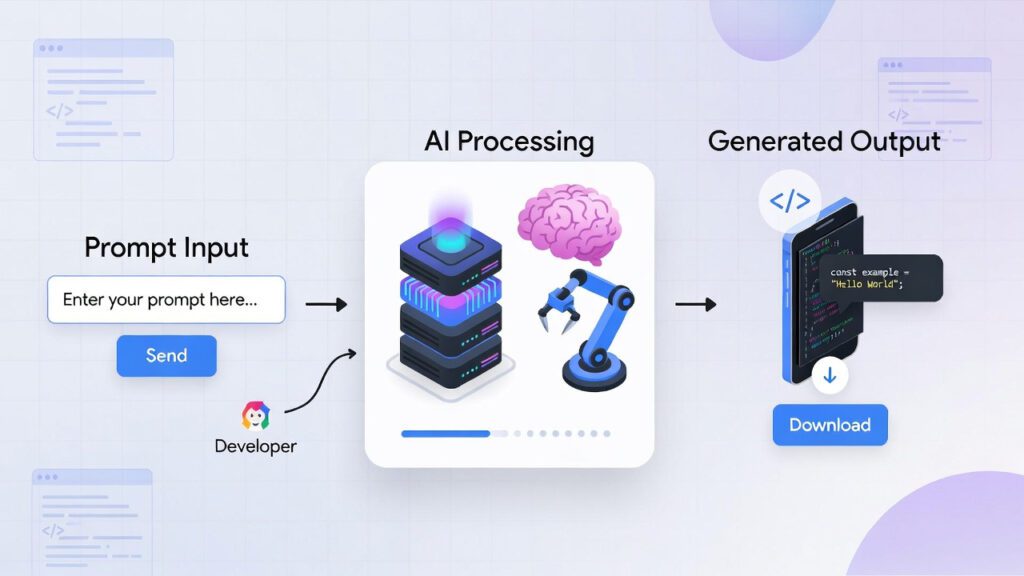
Getting started is simple.
- Sign in with your Google account
- Open Google AI Studio
- Choose text or code generation
- Write a clear and detailed prompt
- Review, refine, and export your output
💡 Tip: The more context you provide, the better the results.
Complete List of Google Free AI Tools (2026)
Google AI Studio is not alone. Instead, it works alongside other powerful tools.
Here’s a complete list:
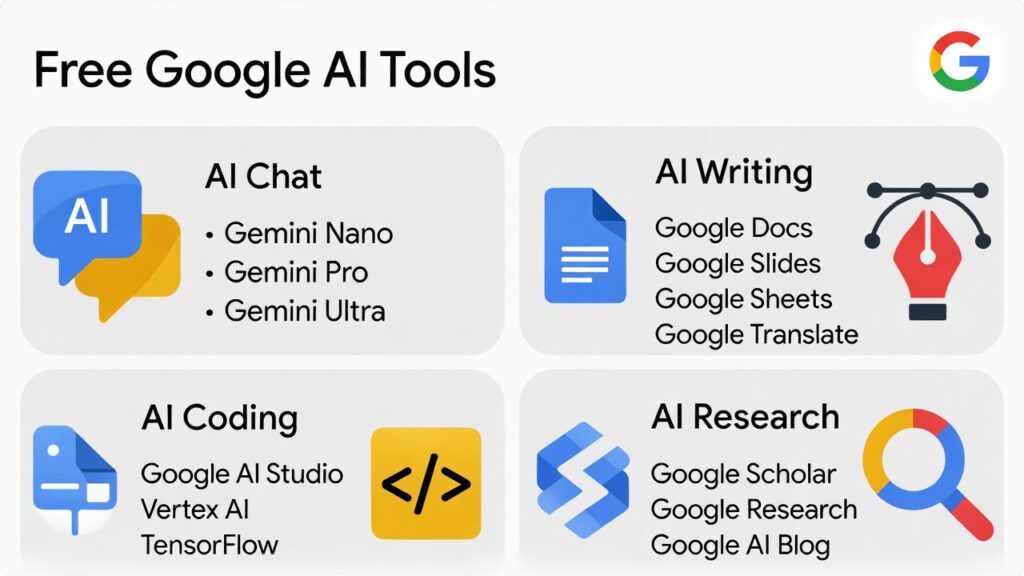
- Google AI Studio – Text and code generation
- Google Gemini – AI assistant for research and learning
- Google Docs AI – Writing and editing assistance
- Google Sheets AI – Smart data analysis
- Google Image AI Tools – Visual enhancement and search
Together, these tools create a complete AI workflow.
Google Gemini: Your Everyday AI Assistant
Google Gemini is designed to assist with daily tasks.
For instance, it can answer complex questions, summarize articles, and brainstorm ideas. Additionally, it integrates directly with Google apps.
As a result, users can work faster without switching platforms.
Google Docs AI: Smart Writing Made Simple
Google Docs includes built-in AI features that help improve writing quality.
These features:
- Suggest clearer sentences
- Improve grammar and tone
- Help rewrite paragraphs
- Speed up content creation
Because it works within Docs, bloggers and students save time without needing to switch tools.
Google Sheets AI: Intelligent Data Analysis
Google Sheets AI helps users understand data without complex formulas.
Instead of manual analysis, users can:
- Ask questions about their data
- Generate insights automatically
- Create summaries and trends
Consequently, even non-technical users can analyze data like professionals.
Google Image AI Tools: Visual Intelligence
Google also offers AI-powered image tools.
These tools help with:
- Image enhancement
- Background removal
- Visual search
- Content inspiration
Therefore, creators can improve visual content without expensive software.
Google Free AI Tools vs Paid AI Platforms
Many paid AI tools charge monthly fees. However, they often rely on Google’s underlying technology.
Here’s a quick comparison:
| Feature | Google Free AI Tools | Paid AI Tools |
|---|---|---|
| Cost | Free | Monthly fees |
| Integration | Full Google ecosystem | Limited |
| Ease of use | Beginner-friendly | Often complex |
| Reliability | High | Varies |
Clearly, Google provides excellent value.
Best Google AI Tools for Bloggers
For bloggers, Google AI Studio is the most valuable tool.
It helps with:
- Blog outlines
- SEO content drafts
- Meta descriptions
- Content rewriting
- Topic research
Meanwhile, Google Docs AI improves readability and flow.
Together, they create a powerful blogging workflow.
How Bloggers Can Use Google Free AI Tools Effectively
Bloggers can use Google Free AI Tools to:
- Plan content calendars
- Research keywords
- Refresh old posts
- Improve SEO structure
- Write faster without sacrificing quality
As a result, content creation becomes more efficient and scalable.
Future of Google Free AI Tools

Google continues to expand its AI ecosystem.
In the future, expect:
- Smarter AI models
- Deeper Search integration
- More automation tools
- Improved personalization
Early adopters will gain a competitive advantage.
Final Thoughts
Google Free AI Tools are powerful, accessible, and often overlooked.
However, those who learn how to use them effectively can save money, increase productivity, and stay ahead in AI-driven industries.
If you want free, reliable, and future-ready AI tools, Google’s ecosystem should be part of your daily workflow.
Frequently Asked Questions
Are Google Free AI Tools really free to use?
Yes, Google Free AI Tools are completely free to use. Most tools, including Google AI Studio, Gemini, and AI features inside Google Docs and Sheets, require only a Google account. No credit card is needed.
What is Google AI Studio used for?
Google AI Studio is used to generate AI-powered text and code. It helps with blog writing, script creation, coding, summarization, idea generation, and prompt testing directly in the browser.
Is Google AI Studio good for blogging and SEO?
Yes, Google AI Studio is excellent for blogging and SEO. It can generate blog outlines, improve readability, write meta descriptions, and help optimize content for search engines.
How does Google Gemini differ from Google AI Studio?
Google Gemini works as an AI assistant for research, learning, and daily productivity. Google AI Studio, on the other hand, focuses more on text and code generation, prompt testing, and content creation workflows.
Can Google Free AI Tools replace paid AI platforms?
For most users, yes. Google Free AI Tools provide enough features for content creation, coding, research, and productivity. Advanced users may still prefer paid tools for niche use cases.
Are Google Free AI Tools safe and secure?
Yes, Google Free AI Tools follow Google’s security and privacy standards. Data protection and account security are handled under Google’s existing policies.
Do I need technical skills to use Google AI tools?
No technical skills are required. Google Free AI Tools are designed for beginners. You can simply write prompts in plain English and refine the output as needed.
Which Google AI tool is best for beginners?
Google Gemini is best for beginners because it works like a conversational assistant. For content creation and experimentation, Google AI Studio is also very beginner-friendly.
Can students use Google Free AI Tools for learning?
Absolutely. Students can use these tools for research, note summarization, writing assignments, coding practice, and productivity without any cost.
Will Google Free AI Tools remain free in the future?
While Google may introduce premium features later, the core tools currently offer generous free access. Google continues to expand its AI ecosystem for wider adoption.