





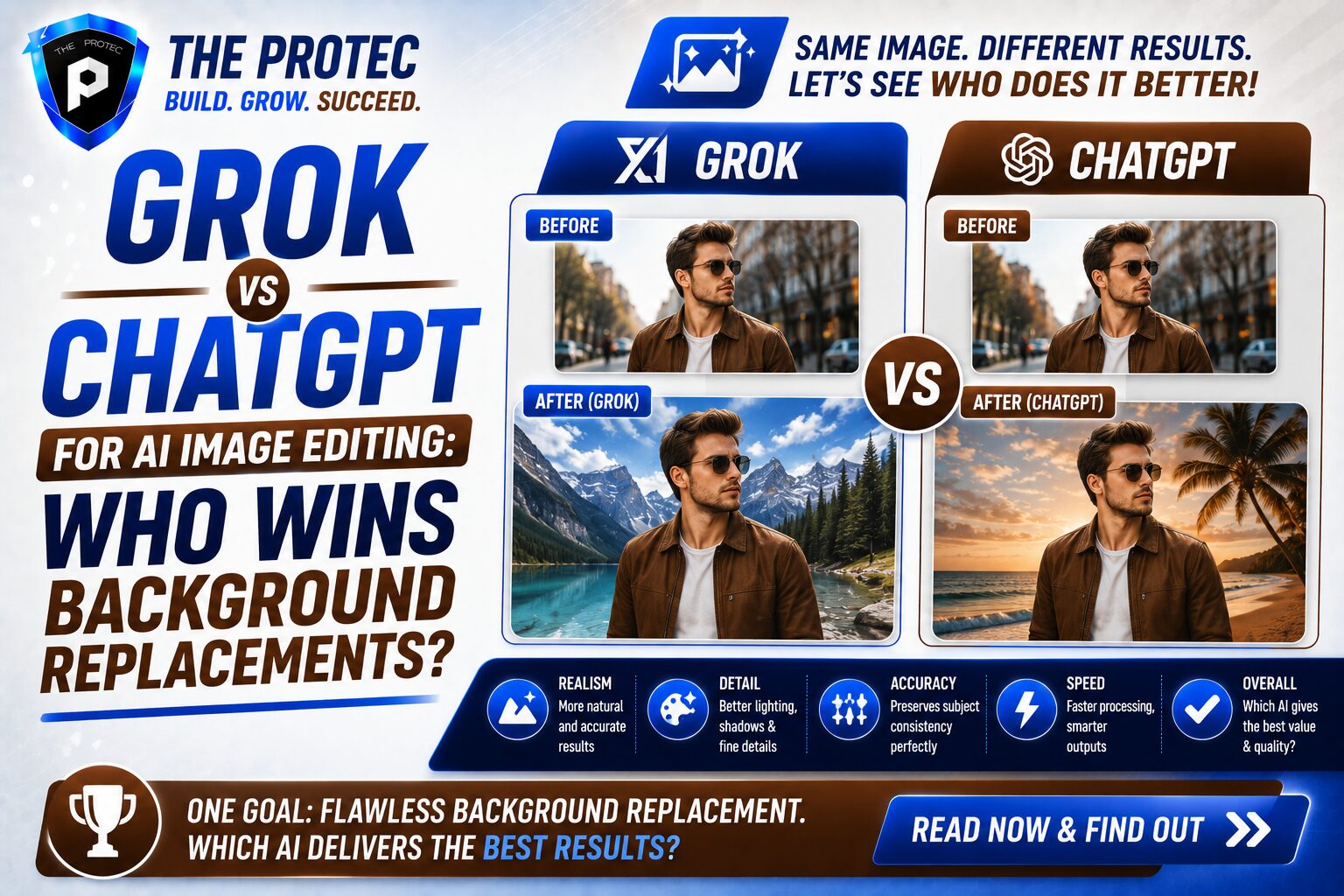
Grok vs ChatGPT for AI Image Editing: Which Creates Better Background Replacements?
AI image editing has moved far beyond simple filters and novelty prompts. Today, the real test is whether an AI can make a believable edit that looks like it came from a professional retoucher. One of the most practical use cases is background replacement: swapping a cluttered room for a polished studio, turning a dull office into a branded environment, or placing a product on a clean commercial backdrop.
That is why the conversation around Grok vs ChatGPT image editing matters. Both tools are increasingly capable, but they do not approach AI background replacement in exactly the same way. One may generate more visually striking results, while the other may be better at preserving details, following instructions, or maintaining a subject’s identity. If you are trying to choose the best AI image editor for practical background swaps, the differences are worth understanding.
This article breaks down how Grok and ChatGPT compare for background replacement, based on real-world editing scenarios, current AI image trends, and the features that matter most to designers, marketers, creators, and small business teams.
Why Background Replacement Is the Ultimate AI Editing Test
Background replacement sounds simple, but it exposes almost every weakness in an AI editor. A strong edit has to do several things at once:
- Keep the subject’s face, body shape, and clothing consistent
- Blend lighting and shadows naturally
- Preserve edges around hair, hands, glasses, and transparent objects
- Match perspective and depth of field
- Produce a background that fits the scene without looking pasted in
If any one of those elements fails, the image looks artificial. That is why background replacement is a more useful benchmark than generic image generation. It tests whether the tool understands context, realism, and composition.
In 2026, users expect more than a “good enough” swap. Social content, ecommerce visuals, ad creatives, profile photos, and presentation assets all demand edits that are believable at a glance and defensible under scrutiny.
How Grok Approaches Image Editing
Grok’s image editing capabilities have evolved into a fast, conversational workflow designed for quick iteration. Its strengths are often tied to immediacy: you can ask for a background change in plain language, refine it, and quickly test different creative directions.
For background replacement, Grok tends to be appealing when you want a bold or stylistic result. It can be especially useful for:
- Creative social media visuals
- Concept mockups
- Fast background swaps with minimal setup
- Playful or dramatic scene changes
In practice, Grok often performs well when the user wants a “make this look cooler” type of edit. It can generate environments that feel vivid and contemporary, and it can be efficient when you want to explore multiple visual variations quickly.
However, background replacement is not just about creativity. It is also about precision. In more demanding scenarios, Grok may be less consistent with fine details like hair outlines, object shadows, or exact subject placement. For editorial work or brand assets, those imperfections can matter.
How ChatGPT Approaches Image Editing
ChatGPT’s image editing workflow is typically stronger when the goal is controlled, instruction-led refinement. It is often better at following a specific brief, especially when the edit needs to stay close to the original subject while changing only the environment.
That matters in AI background replacement, where the best result is usually not the most dramatic one. It is the one that looks natural, preserves identity, and supports the purpose of the image.
ChatGPT is commonly better suited for:
- Professional headshots and profile images
- Ecommerce and product visuals
- Marketing assets that require brand consistency
- Edits where the subject must remain highly recognizable
It tends to excel when the prompt is specific, such as “replace the office background with a bright modern studio while keeping the subject’s pose, facial features, and outfit unchanged.” That kind of task rewards careful adherence to instructions, and ChatGPT often handles it more reliably than a tool that leans more heavily into creative interpretation.
Real-World Comparison: Five Background Replacement Scenarios
To understand Grok vs ChatGPT image editing in practical terms, it helps to look at common use cases. Below are five scenarios where background replacement is frequently needed.
1. LinkedIn Headshot Cleanup
Best result: ChatGPT
A professional headshot needs a clean, believable background without changing the person’s face or expression. ChatGPT tends to do better here because it is more likely to preserve identity and create a subtle, office-appropriate backdrop. Grok can produce attractive results too, but it may introduce stronger stylistic changes that feel less conservative than a recruiter or client would expect.
2. Ecommerce Product-on-Table Scene
Best result: ChatGPT
For products, the background should support the item rather than compete with it. ChatGPT is often better at creating a clean studio table, soft shadowing, and a realistic product placement. This is particularly important for Amazon-style imagery, Shopify banners, and promotional catalogs.
Grok can create attractive lifestyle scenes, but it may be more likely to add visual drama that distracts from the product.
3. Instagram Lifestyle Transformation
Best result: Grok
If the goal is a striking social post, Grok can shine. It often produces more eye-catching backgrounds with stronger atmosphere, color, and style. A creator replacing a bland wall with a neon city scene, tropical rooftop, or cinematic interior may prefer Grok’s more expressive output.
For social-first content, that visual flair can be an advantage.
4. Real Estate or Interior Mockup
Best result: ChatGPT
Real estate imagery needs accuracy and restraint. A room should look plausible, not overly stylized. ChatGPT is generally better at creating a believable architectural backdrop, maintaining perspective, and avoiding odd distortions around furniture or walls.
Grok may create a more polished-looking room, but if the goal is trust and realism, ChatGPT usually has the edge.
5. Creative Poster or Campaign Concept
Best result: Grok
For concept art, event posters, or experimental ad ideas, Grok often generates more visually dynamic scenes. It can be ideal when the background is meant to evoke a mood rather than simply disappear into the composition.
This is where the tool feels closer to a creative collaborator than a strict editor.
Side-by-Side Strengths: Grok vs ChatGPT Image Editing
Here is the simplest way to frame the difference between the two platforms.
Where Grok is stronger
- Fast, conversational experimentation
- More dramatic and creative scene generation
- Better for social media visuals and stylized backgrounds
- Useful when you want multiple visual directions quickly
Where ChatGPT is stronger
- More controlled, instruction-following edits
- Better subject preservation in many professional use cases
- More reliable for clean, realistic background replacement
- Stronger fit for business, ecommerce, and brand assets
If your question is “Which is more fun?” Grok often wins. If your question is “Which is more dependable for a professional background swap?” ChatGPT usually wins.
Quality Factors That Matter Most in Background Replacement
When comparing the best AI image editor for this job, do not judge only by first impressions. A background replacement should be evaluated using a few practical criteria.
Edge handling
Hair, glasses, earrings, and semi-transparent objects are the hardest parts of an edit. A good AI should avoid halos, jagged edges, and unnatural cut lines.
Lighting consistency
The inserted background must match the subject’s lighting direction and intensity. If the subject is lit from the left, the environment should not imply a different source of light.
Perspective accuracy
Furniture, walls, floors, and props need to align with the subject’s position. Small perspective mistakes can ruin the illusion.
Shadow realism
Shadows anchor a subject into the scene. Without them, the image looks cut out. Too much shadow, and the image looks staged.
Identity preservation
For portraits, profile images, and brand content, the person should still look like themselves after the edit. Overly aggressive transformation reduces trust.
Prompting Tips for Better Results in Both Tools
Even the best AI background replacement tool can fail if the prompt is vague. The key is to specify the scene, the lighting, the mood, and what should stay untouched.
- State the exact new background: studio, rooftop, office, street, kitchen, etc.
- Describe lighting: soft daylight, warm sunset, bright studio light, moody indoor light
- Define realism level: photorealistic, minimal retouching, natural shadows
- Tell the model what to preserve: face, pose, outfit, product shape, hands, and text
- Avoid contradictory directions that force the tool to guess
Example prompt: Replace the background with a clean modern office interior, keep the subject centered, preserve facial features and clothing, and match the existing lighting so the subject looks naturally placed in the scene.
That kind of instruction usually yields better results than asking for a generic “professional background.”
What Current AI Image Trends Say About the Competition
The latest AI image trends favor tools that combine speed with control. Users do not want to spend ten minutes cleaning up an image after the AI has done its work. They want an edit that is good enough to publish, or at least close enough to require only minimal manual correction.
That trend benefits both Grok and ChatGPT, but in different ways. Grok fits the demand for rapid creative iteration. ChatGPT fits the demand for dependable, repeatable output that can be used in practical workflows.
Another trend is the growing expectation of context-aware editing. Users want to edit part of an image without destroying the rest of it. In background replacement, this means maintaining subject consistency while allowing the environment to change convincingly. The closer a tool gets to that standard, the more likely it is to become a true production tool rather than just a novelty.
For professionals, this is the decisive factor: a flashy result is not enough. The edit must survive client review, social posting, ad approvals, and close inspection.
Which Tool Is Better for Different Users?
The answer depends on the job.
Choose Grok if you want:
- Fast creative experimentation
- Bold or stylized social content
- Concept visuals and mood-driven edits
- A conversational workflow for quick ideation
Choose ChatGPT if you want:
- More reliable background replacement
- Professional portraits or business assets
- Cleaner realism and stronger subject consistency
- Better results for ecommerce and marketing visuals
For many teams, the smartest answer is not choosing one forever. It is using Grok for ideation and ChatGPT for production-ready refinement. That hybrid approach can be especially effective when time is limited and visual quality still matters.
Our Verdict: Which Creates Better Background Replacements?
If the only metric is visual excitement, Grok can deliver stronger emotional impact. But if the goal is a believable, practical, and polished background replacement, ChatGPT usually comes out ahead.
Here is the bottom line:
- Grok is better for creative, stylized, and social-first edits.
- ChatGPT is better for realistic, controlled, and professional background replacements.
So, when comparing Grok vs ChatGPT image editing, the winner depends on intent. Grok is the better visual idea generator. ChatGPT is more often the better execution tool for the kind of AI background replacement most people actually need.
If you need the best AI image editor for a polished headshot, product shot, or business asset, ChatGPT is usually the safer bet. If you want a more dramatic transformation that grabs attention, Grok may be the more exciting choice.
FAQ
Is Grok or ChatGPT better for AI background replacement?
ChatGPT is usually better for realistic and professional background replacement, while Grok is often stronger for creative, stylized visual edits.
Which tool keeps the subject more consistent?
In many cases, ChatGPT does a better job preserving facial features, pose, and clothing details, which is important for headshots and brand visuals.
Can Grok and ChatGPT both edit backgrounds from a text prompt?
Yes. Both tools can handle prompt-based editing, but the results differ. Grok tends to interpret prompts more creatively, while ChatGPT often follows detailed instructions more closely.
What is the best use case for Grok image editing?
Grok is a strong option for social media content, concept art, and visually dramatic background swaps where creativity matters more than strict realism.
What is the best use case for ChatGPT image editing?
ChatGPT is usually the better choice for professional portraits, ecommerce images, and marketing assets that need a realistic and controlled background replacement.
Final Thoughts
Background replacement may look like a small edit, but it is one of the clearest ways to judge an AI image tool. It shows whether the model understands subject integrity, spatial realism, and visual context. In that test, ChatGPT generally offers the more reliable result, while Grok delivers more energy and creative range.
For creators and businesses, the best approach is to match the tool to the task. Use Grok when you want a bold idea. Use ChatGPT when you need a believable final image. That distinction is what separates a fun demo from a genuinely useful best AI image editor workflow.