






What Is MCP (Model Context Protocol)?
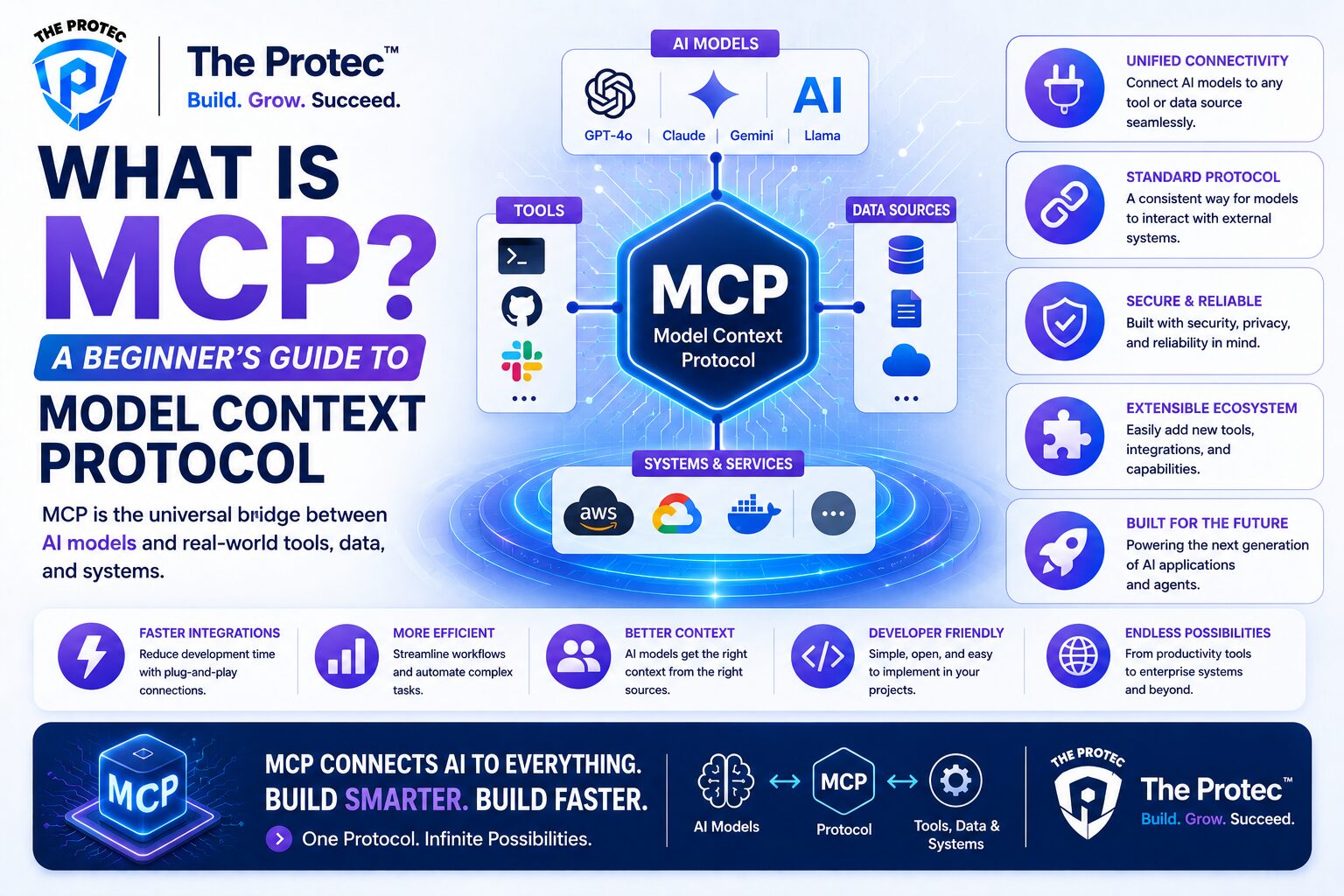
Model Context Protocol, usually shortened to MCP, is an open standard that lets AI applications connect to external tools, data sources, and services in a consistent way. If you have ever built with large language models and found yourself stitching together custom integrations for every database, API, file system, or SaaS tool, MCP exists to solve that problem.
At a high level, MCP gives AI assistants a common language for requesting context and taking action. Instead of building one-off connectors for every model and every app, developers can expose capabilities through an MCP server and let compatible AI clients discover and use them in a structured, secure way.
That is why MCP has become such a major topic in the AI ecosystem. As more teams build agentic workflows, AI copilots, and tool-using assistants, the need for a shared integration layer has grown quickly. MCP is increasingly viewed as the “USB-C for AI integrations” because it aims to standardize how models plug into the world around them.
This MCP tutorial is designed for developers who want to understand the protocol from the ground up: what it is, how it works, why companies are adopting it, and how you can use it in real projects.
Why MCP Matters for Developers
Before MCP, connecting AI models to real-world systems usually meant custom code. One app might need a bespoke connector for Jira, another for PostgreSQL, another for Google Drive, and yet another for internal documentation. Every integration had slightly different request formats, authentication flows, schemas, and error handling.
That approach does work, but it does not scale well. It increases maintenance burden, makes portability difficult, and locks teams into specific model vendors or frameworks. MCP changes the equation by separating the model from the integration logic.
With MCP, developers can build reusable servers that expose tools, resources, and prompts in a standard format. Any MCP-compatible client can then connect to them. That means you can spend less time rebuilding integration glue and more time focusing on the actual product experience.
For MCP for developers, the biggest benefits are:
- Interoperability: One integration can work across multiple AI clients and model providers.
- Reusability: MCP servers can be reused across projects instead of rewritten each time.
- Security: Permissions and access can be handled more cleanly than ad hoc prompt stuffing.
- Scalability: Tool discovery and context delivery become structured and easier to manage.
- Future-proofing: As the ecosystem evolves, standardized integrations are less likely to become obsolete.
How Model Context Protocol Works
MCP is built around a client-server architecture. The AI application, such as a chat assistant, IDE copilot, or agent runner, acts as the client. The external system exposing capabilities acts as the MCP server.
When the client connects to a server, it can discover what the server offers and request only the context or actions it needs. This is a major improvement over dumping huge amounts of irrelevant data into prompts.
The main building blocks of MCP
MCP commonly organizes capabilities into three core concepts:
- Tools: Actions the model can request, such as creating a ticket, querying a database, sending a message, or running a calculation.
- Resources: Readable data sources such as files, documents, records, or structured content.
- Prompts: Reusable prompt templates that help guide model behavior in a consistent way.
These pieces are exposed in a machine-readable format so clients can discover what is available and how to use it. The model itself does not directly “talk” to your database or SaaS app; the MCP client mediates the interaction through the server.
A simple request flow
Here is the typical sequence:
- The user asks the AI assistant to do something, such as “Find the latest customer notes and summarize them.”
- The assistant identifies that it needs external context.
- The MCP client checks connected servers for a relevant resource or tool.
- The server returns metadata, schemas, or the requested data.
- The model uses the returned context to answer or trigger an approved action.
This design keeps the system modular. The model focuses on reasoning and generation, while the MCP server handles access to external systems.
Why Major AI Companies Are Adopting MCP
MCP’s rise is tied to a broader shift in how AI products are built. Early LLM applications often focused on chat. Now the industry is moving toward agentic systems that can search, retrieve, plan, and act across multiple services. To make that practical, the ecosystem needs standardization.
Several major AI companies and platform teams have embraced MCP because it reduces integration fragmentation. Instead of each vendor inventing its own tool-calling ecosystem, MCP offers a common protocol that improves compatibility across assistants, IDEs, and enterprise systems.
There are a few reasons this matters so much:
- Faster ecosystem growth: A shared protocol makes it easier for third-party developers to build once and reach more users.
- Lower integration costs: Enterprises can expose internal systems through one standard interface rather than many custom ones.
- Better developer experience: Tool discovery, schemas, and context handling become more predictable.
- Stronger agent workflows: Agents need reliable access to data and actions, and MCP gives them a cleaner path.
In practice, this means MCP is not just another developer buzzword. It is becoming part of the infrastructure layer for AI applications, especially where assistants must interact with real business systems.
For a broader technical overview, you can also review the official MCP documentation, which provides protocol details and implementation guidance.
MCP vs Traditional APIs
It is helpful to compare MCP with the APIs developers already know. Traditional APIs are excellent for application-to-application communication, but they are not designed specifically for AI clients that need to discover capabilities dynamically and reason about context.
Here is the key difference:
- APIs are usually built for deterministic software calling predefined endpoints.
- MCP is designed for AI clients that need to discover tools, understand schemas, and request context in a structured way.
That does not mean MCP replaces APIs. In fact, MCP often sits on top of APIs. Your server may still call REST endpoints, GraphQL services, or databases behind the scenes. The value is in presenting those capabilities to AI systems in a uniform, model-friendly format.
Think of it like this: APIs are the engine, while MCP is the adapter that makes the engine easier for AI assistants to use.
Practical MCP Examples
The best way to understand MCP is to see how it works in real scenarios. Here are several practical examples of what MCP for developers looks like in production-like environments.
1. Internal knowledge assistant
A company builds an AI assistant that answers questions about policy documents, product specs, and meeting notes. Instead of copying all those files into a prompt, the team exposes the document store through an MCP server.
The assistant can then fetch only the relevant resources when needed. This improves answer quality, reduces token waste, and makes the system much easier to maintain.
2. Developer copilot in an IDE
An IDE plugin connects to MCP servers for Git repositories, issue trackers, and deployment logs. When a developer asks, “Why did this service fail after the last release?” the assistant can inspect recent commits, pull the relevant issue, and summarize the deployment timeline.
This is a strong example of MCP because the assistant needs to combine context from multiple systems, not just generate code from a static prompt.
3. Customer support automation
A support assistant connects to a CRM, ticketing system, and order database through MCP. It can look up a customer, retrieve order history, and suggest an informed response to an agent.
Because the protocol standardizes tool exposure, the support workflow can be extended later without rewriting the whole assistant.
4. Data analysis and reporting
An analyst asks the AI to generate a weekly performance summary. The assistant uses an MCP server to query a warehouse, fetch KPI tables, and generate a concise report with references to the source data.
This works especially well when the data source is large, frequently changing, or protected by strict permissions.
MCP Architecture Basics
If you are evaluating MCP tutorial content for implementation, it helps to understand the basic architecture choices. MCP is usually deployed in a few common ways depending on your environment.
Local MCP servers
Local servers run on a developer’s machine and connect to local files, local databases, or internal tooling. This is convenient for desktop assistants, prototypes, and private workflows.
Remote MCP servers
Remote servers run in a networked environment and expose capabilities over the internet or a private network. These are more common for enterprise systems and shared services.
Transport and communication
Under the hood, MCP uses structured messaging to exchange requests, responses, and capability metadata. The exact transport can vary by client and deployment model, but the important point is that the interaction is standardized and machine-readable.
That standardization is what allows clients to discover available tools and resources instead of hardcoding every integration.
Security Considerations for MCP
Any time an AI system can access tools or data, security becomes a top concern. MCP does not remove the need for good security practices; it makes those practices more manageable by providing a clearer boundary between the client and the server.
Developers should think carefully about:
- Authentication: Who is allowed to connect to the server?
- Authorization: Which tools and resources can each user or client access?
- Scope control: Are you exposing only the minimum necessary data and actions?
- Auditability: Can you log which tools were used and why?
- Data sensitivity: Are you accidentally exposing secrets, private documents, or regulated data?
One of the advantages of MCP is that permissions can be structured around the server and its capabilities, rather than being buried in prompt logic. That makes it easier to reason about access control.
Still, safe deployment requires discipline. Use least-privilege access, sanitize inputs, validate outputs, and keep sensitive operations behind explicit approval steps when needed.
How to Start Building with MCP
If you are ready to experiment, the easiest way to begin is to identify one useful integration in your stack. Good first candidates are read-heavy resources, simple actions, or internal tools that are already well understood.
A practical approach looks like this:
- Choose a focused use case, such as exposing documentation, querying a database, or listing project tickets.
- Define the resources or tools your AI client actually needs.
- Implement a small MCP server around that capability.
- Connect an MCP-compatible client and test discovery, tool use, and output quality.
- Refine permissions, logging, and edge-case handling before expanding scope.
The key is to keep the first version narrow. MCP works best when the server does one thing well and exposes it cleanly.
If you are looking for a reference implementation and examples, the Model Context Protocol GitHub organization is a useful place to explore community projects and SDKs.
Common Mistakes Developers Make with MCP
Like any new standard, MCP can be misused. Here are some common mistakes to avoid.
Exposing too much at once
It is tempting to wrap an entire platform in one giant server. That usually creates confusion and weakens security. Start small and expose only the capabilities the assistant actually needs.
Using MCP as a dumping ground for raw data
MCP is not meant to replace thoughtful data modeling. If a resource is poorly structured, the model will still struggle. Clean schemas and focused resources produce better results.
Ignoring permission boundaries
If your AI client can read everything, it will eventually see something it should not. Access control must be designed from the beginning.
Not testing with real prompts
Prototype success does not guarantee production success. Test with realistic user requests, ambiguous questions, and failure cases to see how the assistant behaves under pressure.
What MCP Means for the Future of AI Integrations
MCP is emerging at exactly the moment when AI products are moving beyond standalone chat. The future is not just about generating text; it is about building systems that can understand context, use tools, and complete tasks reliably across a growing ecosystem of apps.
That is why interest in Model Context Protocol is rising so quickly. It gives developers a practical way to standardize AI integrations, reduce duplication, and build assistants that are more capable and easier to maintain.
Over time, we are likely to see MCP support become a common expectation in AI platforms, developer tools, enterprise software, and agent frameworks. The teams that learn the protocol early will be better positioned to build interoperable AI experiences that last.
FAQ: Model Context Protocol for Developers
What is Model Context Protocol in simple terms?
Model Context Protocol is a standard that lets AI applications connect to external tools and data sources in a consistent way. It helps models discover capabilities and use them without custom integrations for every app.
Is MCP only for advanced AI agents?
No. MCP can be used for simple read-only assistants, developer tools, internal knowledge bots, and full agent systems. It is useful anywhere an AI client needs structured access to context or actions.
Does MCP replace APIs?
No. MCP usually sits on top of APIs or data systems. It provides a standard interface for AI clients, while the underlying services can still be REST, GraphQL, databases, or other systems.
Why is MCP important for developers?
MCP reduces integration complexity, improves portability, and makes it easier to build AI products that connect to multiple tools and data sources. It is especially valuable for teams building AI assistants and agent workflows.
Can MCP be used securely in enterprise environments?
Yes, but only with proper authentication, authorization, logging, and least-privilege access. Like any integration layer, secure design is essential before production use.
Final Thoughts
Model Context Protocol is one of the most important infrastructure trends in modern AI development. It solves a real problem: how to connect models to tools and data in a way that is standardized, reusable, and easier to govern.
For developers, that means less custom glue code and more time building useful experiences. For organizations, it means safer and more scalable AI integrations. And for the ecosystem, it may become the common layer that helps AI assistants work across apps without endless one-off connectors.
If you are exploring MCP for developers today, start with one small integration, learn the server-client model, and focus on clean boundaries. The protocol is still evolving, but the direction is clear: structured context delivery is becoming a foundational part of AI application design.