




Why Remote Workers Need Cybersecurity Gadgets Now
Remote work has matured into a permanent part of modern business, but the security risks around it have become more complex. Today’s remote worker is likely juggling cloud apps, video calls, shared documents, personal Wi-Fi, mobile devices, AI tools, and a long list of accounts that all need to stay protected. That creates a perfect environment for phishing, credential theft, device tracking, webcam abuse, network snooping, and accidental data exposure.
Software security is important, but it is no longer enough on its own. The latest wave of threats is increasingly aimed at the human layer: stolen session cookies, QR-code phishing, MFA fatigue attacks, rogue USB devices, fake accessories, and privacy leakage through microphones, cameras, and Bluetooth radios. That is why cybersecurity gadgets have become a smart investment for remote work security. These privacy devices and hardware tools create physical layers of protection that software alone cannot match.
The right gadgets can make a home office dramatically safer without adding much friction. Some protect logins, others lock down your network, and a few simply help you work in public spaces without exposing confidential information. If you work from home, coffee shops, coworking spaces, airports, or hotels, these are the cybersecurity gadgets worth owning.
1. Hardware Security Keys for Stronger Account Protection
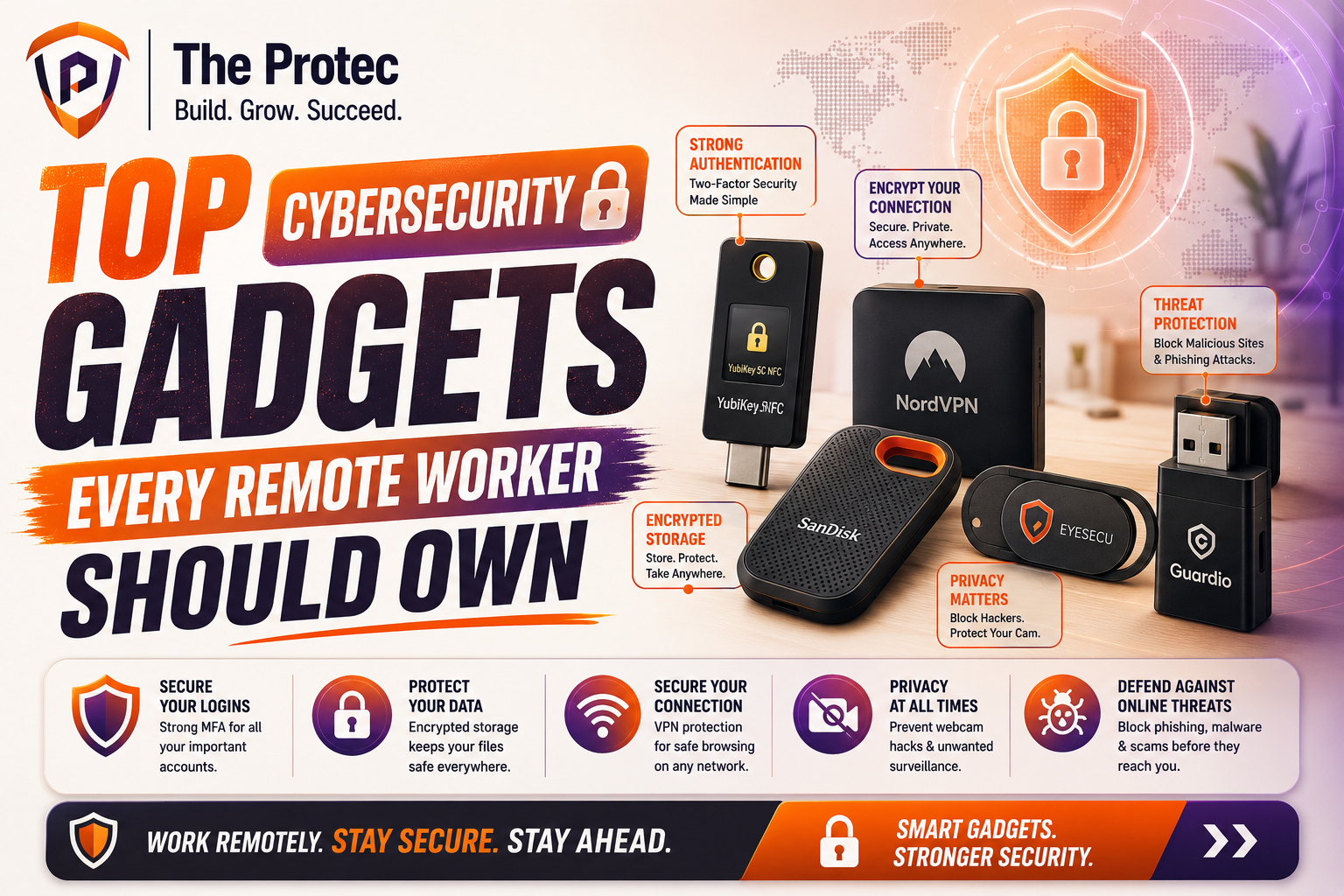
If you buy only one cybersecurity gadget, make it a hardware security key. These compact devices are among the most effective tools for remote work security because they help prevent phishing and account takeover. Instead of relying only on passwords or app-based codes, a hardware key requires physical possession to authenticate a login.
Modern security keys support phishing-resistant authentication standards such as FIDO2 and passkeys. That matters because phishing attacks have evolved. Attackers now use fake login pages, token theft, and social engineering to bypass traditional multi-factor authentication. A hardware key blocks many of those attacks by making the login process cryptographically tied to a legitimate site.
Best use cases
- Securing email, cloud storage, password managers, and collaboration platforms
- Protecting admin accounts and financial tools
- Adding a strong second factor for work and personal logins
Look for keys that support USB-C and NFC so they work across laptops, tablets, and phones. If you manage sensitive client data or have access to company systems, a hardware key is one of the most practical privacy devices you can own.
2. Webcam Covers and Camera Privacy Sliders
Webcam covers are simple, inexpensive, and still highly relevant. Remote workers spend hours on video calls, which makes camera security a real concern. While remote webcam hijacking is not as common as phishing, the risk is real enough that many security professionals still recommend physical camera blockers.
A dedicated webcam cover or built-in privacy slider gives you immediate visual confirmation that the camera is blocked. This is especially valuable for laptops used in shared spaces, at home with family around, or in situations where a software camera indicator can be overlooked. Physical covers are also helpful when you are working with sensitive notes, whiteboards, or confidential paperwork nearby.
What to look for
- A cover that does not damage laptop screens or bezels
- A low-profile design that does not interfere with closing the lid
- Compatibility with external webcams for desk setups
For remote professionals who use their cameras often, the best option is a cover that can be opened and closed in one motion. It is a small privacy device, but it can prevent a big embarrassment or worse.
3. Microphone Blockers and Audio Privacy Devices
Many people focus on the camera and forget the microphone. That is a mistake. Voice data can reveal more than you think, from confidential conversations to background details about your location and routine. In a world of always-on assistants, conferencing apps, smart speakers, and voice-enabled operating systems, microphone privacy has become a real concern.
Microphone blockers and audio privacy devices help reduce accidental recording or listening. Some are physical hardware mute tools for headsets and laptop microphones, while others are inline mute switches or USB audio accessories with a visible hardware mute indicator. The best versions make it obvious when audio is active, which is extremely useful during long meeting days.
Best use cases
- Preventing accidental live microphone access during calls
- Creating a clear visual mute state for work-from-home setups
- Reducing the risk of overheard conversations being captured by smart devices
If you frequently take calls in shared spaces or around family, a dedicated mute accessory is one of the most underrated remote work security tools available.
4. Privacy Screens for Laptops and Mobile Devices
Shoulder surfing is still one of the easiest ways for sensitive information to leak. Whether you are on a train, in a cafe, or in a coworking space, someone nearby may be able to glance at your screen and see client data, internal dashboards, messages, or login prompts. Privacy screens remain one of the most useful privacy devices for remote workers because they narrow the viewing angle and reduce exposure.
Today’s privacy filters are better than older versions. Many offer improved brightness, less color distortion, and compatibility with touchscreens and high-resolution displays. They are especially valuable for people who frequently work outside the home or handle regulated information, such as finance, healthcare, legal, and consulting teams.
Best use cases
- Working in public without exposing open tabs or confidential documents
- Protecting login screens, spreadsheets, and chat apps from side viewers
- Using phones or tablets in transit
A good privacy screen does not replace smart behavior, but it adds a strong visual barrier that helps protect sensitive work in real-world environments.
5. Password Managers with Hardware Support
While a password manager is technically software, the best modern solutions now pair tightly with cybersecurity gadgets such as security keys, biometric unlock, and encrypted hardware-backed storage. This combination makes it much harder for attackers to steal or reuse credentials.
Credential theft remains one of the biggest threats to remote work security. A strong password manager helps generate unique passwords, store passkeys, and reduce the temptation to reuse credentials across work and personal accounts. When paired with a hardware key or biometric authentication, it becomes a much stronger defense against phishing and session hijacking.
What to look for
- Passkey support and phishing-resistant sign-in options
- Cross-device sync for laptops, phones, and tablets
- Zero-knowledge encryption and secure sharing features
If your team uses shared tools, a password manager with hardware-backed access can help protect both solo workers and distributed teams. It is not a flashy gadget, but it is one of the most important parts of a modern security stack.
6. Portable Hardware Firewalls and Travel Routers
Network attacks are a major concern for remote workers who travel or use public Wi-Fi. Portable hardware firewalls and travel routers create a secure buffer between your devices and the open internet. They can isolate your laptop from untrusted networks, support VPN connections, and reduce exposure to local network snooping.
These devices have become more relevant as remote workers increasingly move between home networks, hotels, airports, and coworking spaces. A travel router can create your own trusted mini-network wherever you go, which is useful for both productivity and privacy. Some models also support DNS filtering, guest isolation, and automatic VPN tunneling.
Best use cases
- Protecting laptops and phones on public Wi-Fi
- Creating a secure work network in hotels or short-term rentals
- Separating work devices from personal devices at home
This is especially useful for people who care about remote work security beyond the basics. If your job involves sensitive data or frequent travel, a portable router can be a game-changing privacy device.
7. Encrypted USB Drives and Secure Storage Devices
External drives are still essential for backups, transfers, and offline storage. But plain USB sticks can be a liability if lost or stolen. Encrypted USB drives and secure storage devices solve that problem by protecting data at rest with hardware-based encryption and, in many cases, PIN or biometric access.
These gadgets matter because remote workers often move files between personal and work systems, upload media for clients, or keep offline copies of sensitive documents. If a drive is left in a bag, car, hotel room, or desk drawer, encryption can be the difference between a nuisance and a major incident.
Best use cases
- Storing confidential files offline
- Moving large media or project files securely
- Maintaining encrypted backups of critical documents
Choose a device with strong encryption, a durable shell, and a clear lock/unlock process. For high-value work, hardware-encrypted storage is a more trustworthy option than a standard flash drive.
8. USB Data Blockers and Charge-Only Adapters
Public charging stations are convenient, but they are also a classic attack surface. A malicious or compromised USB port can potentially be used for data theft or device tampering. USB data blockers, often called charge-only adapters, prevent data lines from being used while still allowing power to pass through.
This is a simple but highly effective privacy device for remote workers who travel. It is especially useful in airports, hotels, conferences, and cafes where you may need a quick charge and do not want to trust the port. Some versions are tiny enough to live permanently in your bag or on your keychain.
Best use cases
- Safely charging phones and tablets from public USB ports
- Reducing the risk of data transfer through unknown cables
- Protecting against juice jacking style threats
For maximum safety, pair a data blocker with your own wall adapter or a trusted power bank. That combination keeps charging simple without exposing your devices to unnecessary risk.
9. Privacy-Focused Power Banks and Charging Accessories
Power banks are not usually discussed as cybersecurity gadgets, but the newest models can contribute meaningfully to remote work security. A trusted power bank reduces the need to use public charging stations, borrowed cables, or unfamiliar USB ports. Some models also include integrated cables, low-current charging modes for wearables, and built-in device detection to avoid inconsistent power delivery.
When you are working on the move, battery anxiety can push you into risky habits. You may plug into a random wall unit, use an untrusted cable, or leave your phone in a public charging bay. A reliable power bank helps you stay self-sufficient and reduce those exposures.
Best use cases
- Keeping laptops, tablets, and phones charged during travel
- Avoiding public USB ports and shared charging stations
- Supporting secure work sessions away from the desk
Look for power banks from reputable brands with clear safety certifications, strong battery management, and enough output to charge your primary devices efficiently.
10. Faraday Bags for Phones, Keys, and Backup Devices
Faraday bags block wireless signals such as cellular, Wi-Fi, Bluetooth, and sometimes NFC. For remote workers, they can be useful privacy devices when you want to isolate a phone, spare key fob, or backup device from tracking and unwanted connectivity. While they are not necessary for everyone, they are highly practical in certain situations.
They are especially relevant for people who travel often, attend high-security meetings, or simply want to ensure that a backup phone stays disconnected until needed. A Faraday bag can also help prevent a device from broadcasting when you do not want it to, which adds a layer of operational privacy.
Best use cases
- Storing backup phones or travel devices offline
- Disabling wireless signals during sensitive meetings
- Reducing location tracking and radio exposure
Choose a well-made bag with verified signal blocking and a secure closure. Cheap versions can be inconsistent, so quality matters here.
How to Choose the Right Cybersecurity Gadgets
The best cybersecurity gadgets are the ones you will actually use every day. Start by identifying your biggest risks. If account takeover is your main concern, a hardware security key should be first on your list. If you travel frequently, a privacy screen, USB data blocker, and travel router may deliver more value. If your work involves confidential conversations, audio and camera privacy devices should move higher up the priority list.
It also helps to think in layers. A secure home office might combine a hardware key, a password manager with passkey support, a webcam cover, and a privacy screen. A travel-friendly setup might add a portable router, a power bank, an encrypted USB drive, and a data blocker. The point is not to buy everything. The point is to reduce exposure where it matters most.
When evaluating privacy devices, check compatibility with your operating system and devices, whether the product requires cloud registration, and how easy it is to use under stress. Security tools that are awkward tend to get ignored, which defeats the purpose.
Building a Practical Remote Work Security Kit
A strong remote work security kit does not have to be expensive or complicated. A balanced setup for most professionals could include a hardware security key, a webcam cover, a privacy screen, and a trusted password manager. If you travel regularly, add a charge-only adapter, a power bank, and a portable router. If your work is highly sensitive, consider encrypted storage and a Faraday bag as well.
The most effective approach is to match gadgets to real-world habits. Someone who works from a home office all day has different needs than a consultant moving between airports and coworking spaces. But both benefit from physical security tools that reduce the chance of simple mistakes turning into serious incidents.
Cybersecurity gadgets are not about paranoia. They are about control. They help remote workers keep cameras closed when they should be, block risky ports, secure logins, and reduce the amount of trust placed in unknown networks and devices. In a threat landscape shaped by phishing, token theft, and privacy leakage, that kind of control is increasingly valuable.
FAQ: Cybersecurity Gadgets for Remote Workers
What is the most important cybersecurity gadget for remote workers?
A hardware security key is often the most important because it provides strong protection against phishing and account takeover. For many workers, it is the single best upgrade to remote work security.
Are privacy devices really necessary if I work from home?
Yes, depending on your setup. Home offices still face risks from webcams, microphones, insecure Wi-Fi, shared devices, and accidental exposure during video calls. Privacy devices add physical protection that software alone cannot provide.
Do I need a travel router if I already use a VPN?
A VPN helps protect traffic, but a travel router can add another layer by creating a trusted local network and reducing exposure to risky public Wi-Fi setups. Many remote workers use both together for better remote work security.
Can USB data blockers stop all charging-port attacks?
They can significantly reduce risk by blocking data lines, but they are not a cure-all. The safest option is still to use your own charger or power bank whenever possible and avoid unknown public USB ports.
What should I buy first if I’m on a budget?
Start with a hardware security key, a webcam cover, and a password manager. Those three give excellent protection for the cost and address some of the most common remote work threats.
Final Thoughts
The best cybersecurity gadgets are practical, not flashy. They solve specific problems: stolen logins, exposed screens, open microphones, risky charging ports, and untrusted networks. For remote workers, those risks are part of daily life, which is why privacy devices and hardware protections matter more than ever.
If you want to strengthen remote work security, build your setup in layers. Use a hardware security key for accounts, a privacy screen for public work, a webcam cover and audio mute tool for calls, and travel-friendly devices for charging and networking. With the right mix of cybersecurity gadgets, you can work more confidently anywhere without giving up convenience.