








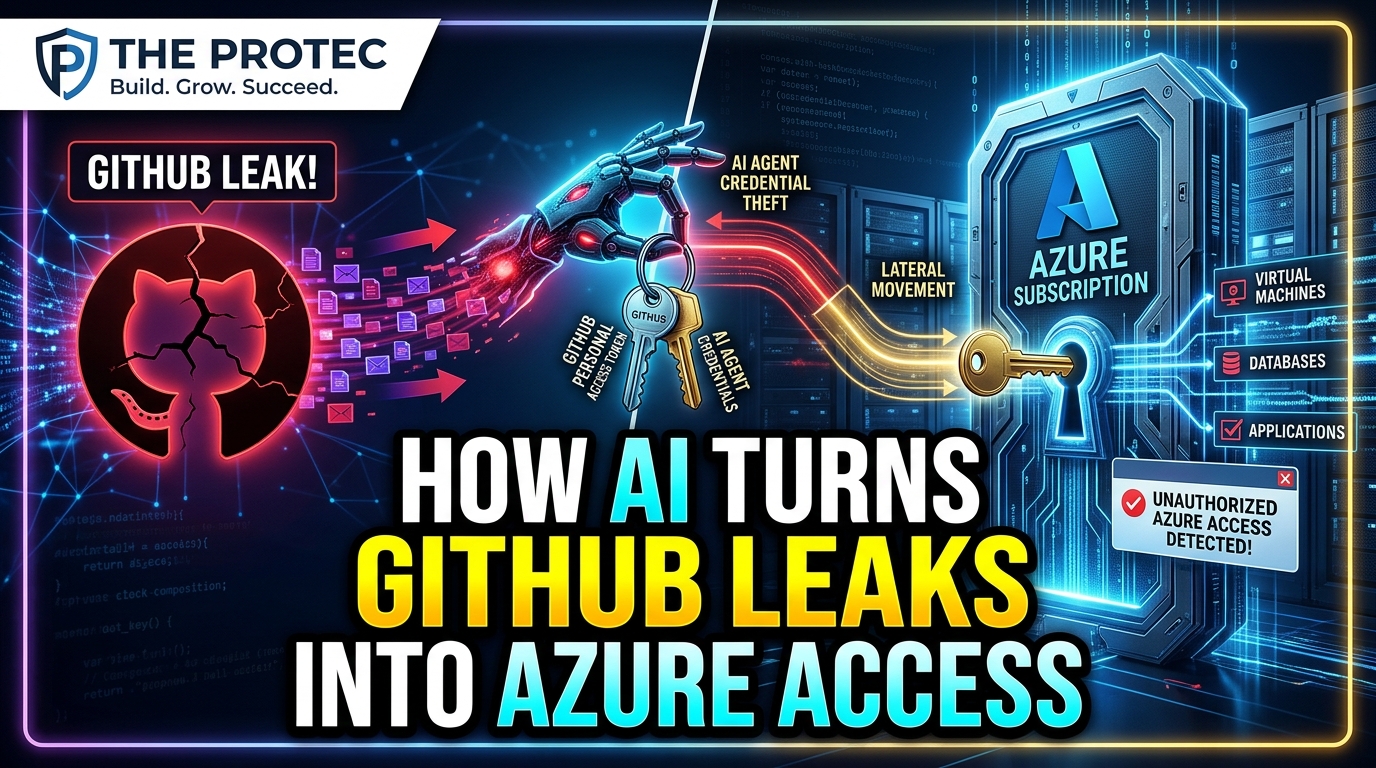
A secret committed to a public repository has always been dangerous, but automation is compressing the time defenders have to react. In a November 5 disclosure, Microsoft described AI agent credential theft that moved from locating exposed GitHub credentials to accessing and exfiltrating data from Azure Key Vault in approximately five minutes. The speed matters: credential exposure can now become an active cloud compromise before a developer notices the commit, removes the file, or begins incident response.
According to Microsoft, threat actors used ARTEX, an agentic AI offensive framework, to search public GitHub repositories for secrets and automate subsequent stages of an attack. The activity went beyond speculative demonstrations of what an autonomous agent might eventually do. Microsoft reported observed incidents involving exposed service-principal credentials, compromised OAuth application credentials, Azure resource discovery, and access spanning multiple tenants.
For developers and cloud administrators, the central lesson is straightforward: removing a leaked credential from GitHub is not remediation. The credential must be invalidated, its permissions and use investigated, affected data reviewed, and the identity architecture changed to reduce the chance of another reusable secret escaping.
What Microsoft disclosed about the ARTEX AI attack framework
Microsoft published its findings in a November 5 security report on agentic AI tooling and exposed secrets. The company said attackers were using ARTEX to combine credential discovery with cloud attack operations that would traditionally require several separate scripts, tools, and manual decisions.
The framework could search public repositories, identify material that appeared to be a usable credential, test access, and continue with actions appropriate to the compromised identity. In the five-minute case highlighted by Microsoft, the agent progressed from discovering secrets on GitHub to exfiltrating information from Azure Key Vault.
That finding does not mean every exposed GitHub secret will automatically produce an Azure Key Vault breach. A successful chain depends on factors such as whether the credential remains valid, what identity it belongs to, which tenant accepts it, and what permissions the identity holds. It does show, however, that attackers can automate those checks quickly enough to make traditional, human-paced response assumptions unsafe.
How the GitHub-to-Azure attack chain works
Microsoft’s investigation illustrates how a public code leak can become cloud credential theft through a series of tightly connected steps.
- Automated repository searches: The attacker directs an AI agent to inspect public GitHub content for strings, configuration files, environment files, deployment scripts, or code patterns that could contain credentials. Automation allows the search to operate continuously and across many repositories.
- Credential identification: The framework evaluates discovered material to determine whether it resembles an application secret, OAuth credential, service-principal credential, or another authentication artifact. Context in filenames and source code can help the agent infer the relevant cloud platform and authentication flow.
- Service-principal authentication: If the exposed values include the information required to authenticate an Azure service principal, an attacker may request an access token as that workload identity. This avoids the interactive controls normally associated with a human account, such as a password prompt.
- Azure resource enumeration: After authentication, the agent can test which subscriptions, resource groups, vaults, storage accounts, or other services are visible to the identity. Enumeration establishes what the stolen credential can reach and where valuable data may reside.
- Key Vault and Storage access: Excessive permissions may let the compromised identity read Azure Key Vault secrets or access Azure Storage data. The exact result depends on assigned Azure roles, Key Vault access policies, resource configuration, and the scope of those permissions.
- Possible data exfiltration: If read access is available, the attacker can retrieve accessible information. Secrets taken from Key Vault may also provide credentials for additional systems, allowing the compromise to expand beyond the identity exposed on GitHub.
Agentic automation is significant because it can connect these stages without waiting for an operator to inspect each result. An agent can adapt its next action to the permissions or resources it discovers, making the interval between exposure and exploitation much shorter.
The five-minute Azure Key Vault breach was observed, not hypothetical
Discussions of agentic AI cybersecurity often mix demonstrated incidents with forecasts about future autonomous attacks. Microsoft’s disclosure requires a clearer distinction.
The approximately five-minute progression from GitHub secret discovery to Azure Key Vault data exfiltration was an observed case reported by Microsoft. The company also reported activity involving compromised OAuth application credentials and unauthorized access across multiple tenants. Those campaign findings should be treated as evidence of real operational use of AI-assisted offensive tooling.
Other outcomes remain conditional. A leaked credential does not guarantee access to Key Vault, Azure Storage, or every tenant connected to an application. Nor does Microsoft’s report establish that AI agents can bypass every cloud security control. The demonstrated advantage is speed and orchestration: ARTEX helped attackers find credentials, validate them, map reachable resources, and act on available permissions with limited delay.
Why deleting GitHub exposed secrets is insufficient
Deleting a secret from a repository only removes one place where it is currently visible. It does not invalidate the credential. Copies may remain in commit history, forks, pull requests, local clones, build logs, caches, search indexes, notifications, or data already collected by automated scanners.
If an attacker has used the credential, simply rewriting Git history also leaves the unauthorized access path open. The service principal or OAuth application may continue accepting the same client secret until it expires or an administrator revokes it.
Incident response must therefore begin with rotation or revocation. Administrators should create a replacement credential where one is still necessary, update legitimate workloads securely, verify that they use the replacement, and then disable the exposed credential. If the credential protected or unlocked other secrets, those downstream values may also require rotation.
Teams must investigate the period beginning before the first known public exposure. Repository timestamps are helpful, but they do not prove when a secret was copied or first abused.
How to respond to suspected AI agent credential theft
1. Revoke and rotate the exposed credential
Identify the credential type and its owning identity. Remove compromised client secrets or certificates from the affected application or service principal, rotate connected secrets, and verify that production services continue using approved credentials. Consider the lifetime of tokens already issued with the stolen credential when defining the containment window.
2. Review Microsoft Entra ID security data
Examine service-principal sign-in logs, application activity, audit events, token issuance patterns, and changes to credentials or permissions. Look for unfamiliar source addresses, unexpected geographies, new user agents, unusual resource access, and authentication at times inconsistent with the workload’s normal behavior.
Workload identities often behave predictably. A service principal that normally authenticates from one deployment environment should receive scrutiny if it suddenly accesses several tenants or begins requesting resources unrelated to its purpose.
3. Inspect Azure resource activity
Review Azure Activity Logs alongside diagnostic logs for Key Vault, Storage, and other affected services. Investigators should determine which vault operations were performed, which objects were read, whether storage data was listed or downloaded, and whether role assignments or policies changed.
Do not stop after finding a successful sign-in. Authentication confirms that the credential worked; resource-level records help establish what the attacker did after gaining access.
4. Reduce privileges before restoring access
Reassess every role assigned to the identity, including inherited access at management-group, subscription, resource-group, and resource levels. Replace broad roles with narrowly scoped permissions that support the workload’s actual task. Separate identities for unrelated services so that one leaked credential cannot expose multiple environments.
Scan repository history, forks, pipeline logs, artifacts, tickets, documentation, and developer systems for the same value and for other secrets stored nearby. If one hard-coded credential was found, similar development practices may have exposed additional keys.
Managed identities and federation shrink the attack surface
The most effective defense against leaked static secrets is to avoid creating them when possible. Azure managed identities let supported workloads obtain tokens without storing a reusable client secret in source code or configuration. The identity remains tied to the Azure resource and can be granted only the access that workload requires.
For external automation such as GitHub Actions, workload identity federation can replace long-lived cloud credentials with short-lived tokens issued under defined trust conditions. This reduces the value of repository scanning because there is no durable Azure client secret to recover.
Neither approach eliminates the need for least privilege. A compromised workload with excessive permissions can still be abused through its legitimate identity. Managed identities, federation, narrow role assignments, network restrictions, and resource logging should operate together.
Detecting suspicious service-principal activity
Organizations should build monitoring around how machine identities are expected to behave rather than applying only human-account rules. Useful detections include:
- First-time service-principal authentication from a new network, country, hosting provider, or device profile.
- Access to Key Vault or Storage by an identity that has not previously used those services.
- Rapid enumeration of subscriptions, resource groups, vaults, or storage accounts after authentication.
- One application identity appearing across unexpected tenants.
- High-volume secret reads, object listings, or downloads over a short period.
- Credential additions, consent grants, role changes, or new application permissions near suspicious sign-ins.
- Use of a credential soon after it appears in a public repository or build artifact.
Alerts should be tied to an incident playbook that names the teams authorized to revoke application credentials, preserve logs, contact application owners, and assess data exposure. In a five-minute attack chain, escalation paths that depend on prolonged manual approval can become a material weakness.
What this means for cloud security teams
Microsoft’s research shows that AI is not required to invent a new vulnerability to change cyber risk. ARTEX accelerated a familiar problem—publicly exposed credentials—by linking discovery, authentication, reconnaissance, and exploitation into an agent-driven workflow.
The practical response is similarly grounded: eliminate static credentials where possible, rotate every exposed key, constrain workload identities, collect detailed resource logs, and alert on abnormal service-principal behavior. Teams should assume that a public secret may be tested almost immediately, not after a researcher or developer has time to send a warning.
Frequently asked questions
What is AI agent credential theft?
AI agent credential theft is the use of agentic automation to locate exposed credentials, determine how they can be used, authenticate to services, and perform follow-on actions. In Microsoft’s reported ARTEX activity, the workflow included public GitHub searches and subsequent access to Azure environments.
Did an AI agent really reach Azure Key Vault in five minutes?
Yes, according to Microsoft. The company reported an observed case in which an AI agent moved from finding exposed GitHub secrets to exfiltrating data from Azure Key Vault in approximately five minutes. The result depended on valid credentials and the permissions assigned to the compromised identity.
Is removing a secret from GitHub enough?
No. Removal does not invalidate the credential or erase copies from history, forks, clones, caches, or attacker systems. The credential must be revoked or rotated, related activity investigated, and any accessible downstream secrets assessed.
How can organizations prevent similar cloud credential theft?
Use managed identities or workload identity federation instead of long-lived secrets, enforce least privilege, scan code and history for credentials, restrict access to sensitive Azure resources, and monitor service-principal sign-ins and resource operations for abnormal behavior.