









Contents
- 1 Introduction
- 2 Why Passwords Are Failing Modern Login Security
- 3 What Is Passwordless Authentication?
- 4 The Main Technologies Replacing Passwords
- 5 How Passwordless Login Improves Security
- 6 Why Users Prefer Passwordless Authentication
- 7 Where Passwordless Authentication Is Being Adopted
- 8 The Role of Passkeys in the Future of Authentication
- 9 Challenges and Risks in Going Passwordless
- 10 What Comes Next for Passwordless Authentication
- 11 Best Practices for Adopting Passwordless Login
- 12 Frequently Asked Questions
- 12.1 Is passwordless authentication safer than passwords?
- 12.2 Does biometric login mean my fingerprint or face is stored online?
- 12.3 Can passwordless systems still be phished?
- 12.4 What is the difference between passkeys and biometric login?
- 12.5 Will passwordless authentication replace all passwords?
- 13 Conclusion
Introduction
Passwords have been the default way to prove identity online for decades, but they have also been one of the weakest links in digital security. People reuse them, forget them, write them down, and fall for phishing attacks that steal them in seconds. As businesses and consumers demand faster, safer access to apps and accounts, passwordless authentication is emerging as the clearest path forward.
The shift is not just about convenience. It is about rebuilding login security around methods that are harder to steal, harder to guess, and easier for users to trust. From biometric login to passkeys and device-based authentication, the future of authentication is already taking shape. The biggest change is simple: instead of asking users to remember a secret, modern systems verify who they are through something they have, something they are, or a secure cryptographic key tied to their device.
This article explains how passwordless login systems work, why they are becoming mainstream, and what technologies are driving the move away from passwords. It also looks at the practical benefits, the risks, and the future trends that are shaping authentication across consumer apps, enterprise platforms, and regulated industries.
Why Passwords Are Failing Modern Login Security
Passwords were built for a different era of computing. They were designed when fewer services existed, threat actors were less automated, and user accounts were less central to daily life. Today, a single person may manage dozens or even hundreds of online logins across work, banking, healthcare, cloud tools, and ecommerce platforms. That volume makes password management nearly impossible.
The core problem is that passwords depend on human memory and human behavior. In practice, that leads to weak choices, reuse across sites, and resets that create extra support burden. Even strong passwords can be phished, intercepted through malware, or exposed in data breaches. Once a password is stolen, attackers often use it to access multiple accounts through credential stuffing, one of the most common account takeover techniques.
Security teams have also learned that traditional multi-factor authentication, while better than passwords alone, is not always enough. SMS codes can be intercepted or socially engineered, and push-based approvals can be exploited through fatigue attacks. That is why many organizations are now moving toward passwordless authentication, where the login method itself removes the shared secret that attackers typically target.
What Is Passwordless Authentication?
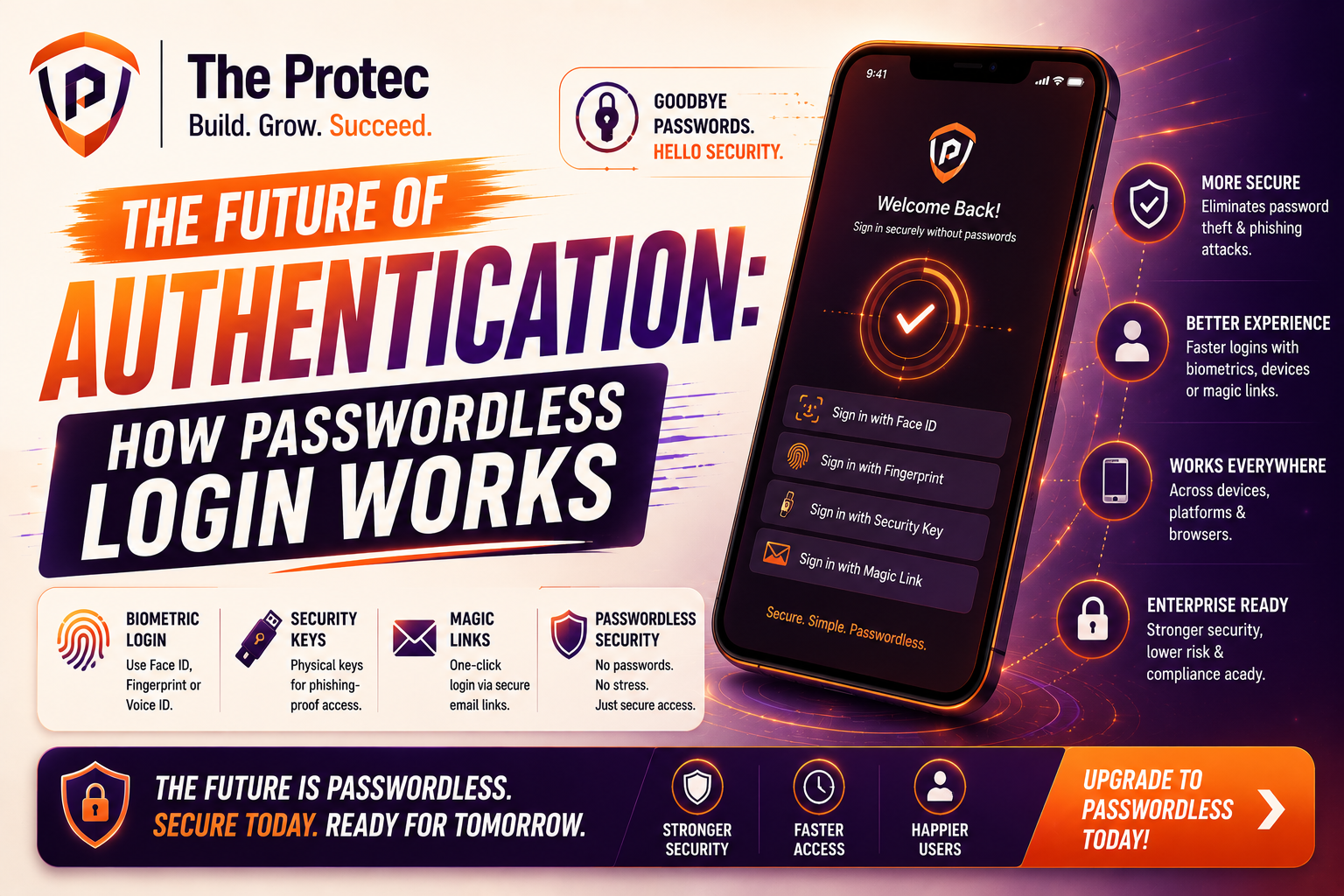
Passwordless authentication is a login model that verifies a user without requiring a password. Instead of entering a memorized secret, the user authenticates through a secure alternative such as a passkey, biometric login, hardware token, authenticator app, or device-bound cryptographic credential. The goal is to eliminate password risk while making sign-in faster and more intuitive.
In a passwordless flow, authentication is usually based on public key cryptography. A device stores a private key securely, while the matching public key is registered with the service. During login, the service sends a challenge, and the device proves possession of the private key by signing it. Because the private key never leaves the device, phishing is far less effective and stolen database credentials are no longer useful to attackers.
That is the key difference between passwordless authentication and classic password systems. Passwords are shared secrets stored or transmitted in forms that can be stolen. Passwordless systems use proofs that are much harder to copy or replay. This makes them a major upgrade in login security, especially for high-value accounts and environments that face targeted attacks.
The Main Technologies Replacing Passwords
Passkeys and FIDO-based authentication
Passkeys are now one of the most important developments in passwordless authentication. Built on the FIDO Alliance and WebAuthn standards, passkeys let users sign in with a device-stored credential instead of a password. They are designed to be resistant to phishing and replay attacks because the credential is bound to the site and the device.
Passkeys can be synced across user devices through secure platform ecosystems, making them easier to adopt than older hardware-only approaches. For most users, the experience feels simple: approve the login with a fingerprint, face scan, or device PIN, and access is granted. Under the hood, however, the process is cryptographically strong and far more secure than password-based login.
For a technical overview of the underlying standards, the FIDO Alliance passkeys resource is a useful starting point.
Biometric login
Biometric login uses physical characteristics such as fingerprints, facial features, or voice patterns to confirm identity. It is popular because it feels natural and fast. Users already unlock phones and laptops with biometrics, so extending that experience to app sign-in is a logical next step.
Biometric login is not stored or transmitted in the same way as a password. In modern systems, the biometric data is usually converted into a local template and protected inside secure hardware on the device. The service does not need to receive the raw biometric itself. Instead, the biometric acts as a local unlock for the private key or authentication token.
This is an important distinction. Biometrics are not the passwordless credential by themselves; they are often the user-friendly gate that activates a stronger underlying authentication mechanism. Used correctly, biometric login improves both usability and login security.
Authenticator apps and device-based approval
Authenticator apps remain a practical step toward passwordless authentication, especially in mixed environments where full passkey support is still being rolled out. Instead of sending a code by SMS, an app can generate time-based codes or, in more modern implementations, approve a login request directly on a trusted device.
Device-based approval reduces the risk associated with intercepted messages and SIM-swap attacks. When combined with strong device binding, it becomes part of a broader passwordless strategy. Many organizations use it as a bridge while they transition users from passwords to passkeys and other stronger methods.
Hardware security keys
Security keys are small physical devices that store cryptographic credentials and are often used for high-security access. They are especially useful in enterprise environments, privileged access workflows, and roles where phishing resistance matters most. When plugged in, tapped, or connected wirelessly, the key helps prove the user’s identity without exposing a password.
Hardware keys can be an excellent fit for admins, developers, executives, and remote teams handling sensitive systems. They are less convenient than built-in biometric login for mass consumer use, but they remain one of the strongest forms of login security available today.
How Passwordless Login Improves Security
Passwordless authentication improves login security in several important ways. The first is phishing resistance. Since users are not typing a password into a website, attackers have far fewer opportunities to trick them into revealing a reusable secret. Passkeys and hardware-backed credentials are also bound to specific domains, which means a fake login page cannot easily reuse the same credential.
The second benefit is protection against credential reuse. When a password is stolen from one site, attackers often test it elsewhere. Passwordless systems eliminate that shared secret, so a breach at one service does not automatically compromise other accounts. This reduces the blast radius of attacks and lowers the value of stolen credential databases.
The third benefit is stronger defense against brute-force attacks. There is no password to guess, so attackers cannot cycle through common combinations or use automated cracking tools against a reusable secret. Instead, they would need to defeat device security, compromise the hardware, or exploit an implementation flaw, all of which are much harder than traditional password attacks.
Passwordless authentication can also reduce dependence on weak recovery flows. Password reset channels are a common target for account takeover because they often rely on email access, SMS, or help desk verification. A well-designed passwordless system can make account recovery more secure by tying identity recovery to trusted devices, verified identity proofing, or enterprise-managed recovery policies.
Why Users Prefer Passwordless Authentication
The strongest security control in the world can still fail if users resist it. One reason passwordless authentication is gaining momentum is that it improves the experience instead of making it harder. Users do not have to invent new passwords, remember periodic changes, or deal with repeated reset prompts. Sign-in becomes faster and less frustrating.
Biometric login is a big part of that appeal. A quick face scan or fingerprint touch feels more natural than typing a complex password on a mobile device. On desktop, passkeys can also streamline access by using a nearby phone, secure platform credential, or trusted device prompt. This reduces friction at the exact moment when users are most likely to abandon a login flow.
For organizations, the user experience gains can translate into lower support costs. Password resets consume time for service desks and IT teams, especially in large environments. Moving to passwordless authentication can reduce these tickets significantly while improving employee satisfaction and productivity.
Where Passwordless Authentication Is Being Adopted
Passwordless login is expanding across consumer apps, enterprise identity platforms, banking, healthcare, and government services. Consumer technology companies are adopting passkeys because they improve mobile sign-in and reduce account recovery issues. Enterprise platforms are using passwordless methods to secure workstations, SaaS tools, VPN access, and privileged systems.
Financial services are particularly interested in stronger login security because account takeover has direct monetary consequences. Healthcare organizations are also moving toward passwordless options to protect patient portals and reduce credential-sharing risks. In regulated industries, the combination of stronger identity proofing and device-based authentication helps meet evolving security and compliance expectations.
Even traditional identity providers are building passwordless support into their products. That matters because broad adoption usually depends on ecosystem support, not just individual apps. A passwordless future becomes realistic when operating systems, browsers, identity platforms, and application developers all support the same standards.
The Role of Passkeys in the Future of Authentication
Passkeys are likely to become the default experience for many users because they balance security, portability, and convenience. They are built to work across devices and services while preserving the core benefit of public key authentication. Unlike passwords, passkeys are not something users need to memorize or rotate.
The broader significance of passkeys is that they normalize the idea that login security should be invisible to the user. People do not need to understand cryptographic details to benefit from them. They just need a simple prompt and a trusted device. That shift is crucial if passwordless authentication is going to reach mainstream adoption at scale.
Passkeys also align well with the direction of modern platforms. Browser support, mobile operating system integration, and enterprise identity tooling are all improving. As more services support synced and device-bound passkeys, users will increasingly expect passwordless login as the default rather than an advanced option.
Challenges and Risks in Going Passwordless
Although passwordless authentication is a major step forward, it is not a silver bullet. Implementation quality matters. If recovery processes are weak, if devices are poorly managed, or if identity proofing is lax, attackers may still find a path in. Removing passwords does not remove the need for strong security architecture.
Device loss is another consideration. A passwordless system should have a reliable but secure way to restore access if a user loses their phone or security key. That recovery path must be carefully designed so it does not become the weakest link. Organizations should balance convenience with protections such as step-up verification, trusted device checks, and admin oversight.
Compatibility can also slow adoption. Some legacy applications may not support modern authentication standards, and some user groups may still rely on older devices. In those cases, a phased rollout is usually best. Start with high-risk accounts, privileged users, or new sign-ins, then expand as support matures.
Finally, biometric login raises privacy and governance questions. Even though modern systems typically store biometric templates locally, organizations still need to communicate clearly about how data is handled and ensure that policies meet legal and regulatory requirements. Transparency builds trust and prevents the misconception that biometrics are being centrally collected and stored.
What Comes Next for Passwordless Authentication
The next phase of passwordless authentication is likely to be more integrated and more adaptive. We are moving toward systems that combine passkeys, biometrics, device trust, behavioral signals, and contextual risk scoring. Instead of asking for the same level of proof every time, modern platforms will increasingly use risk-based authentication that responds to the situation.
For example, a familiar device on a normal network may require only a biometric login, while a new device in a high-risk location might trigger additional verification. This approach improves login security without forcing every user into the same rigid flow. It also supports the broader shift toward zero trust, where identity is continuously evaluated rather than assumed after one initial login.
We can also expect better cross-device experiences. Users will want to sign in seamlessly from phones, tablets, laptops, and shared workstations. Passwordless systems will continue to evolve to support those use cases without reintroducing the vulnerabilities of passwords or one-time codes.
Another likely development is deeper integration with identity verification and account recovery. As organizations mature, passwordless authentication will not exist in isolation. It will connect to fraud detection, secure enrollment, lifecycle management, and trusted recovery workflows. The result will be a more complete identity system rather than just a better login screen.
Best Practices for Adopting Passwordless Login
- Start with high-risk accounts and users who benefit most from stronger login security.
- Choose standards-based solutions such as passkeys and WebAuthn to avoid vendor lock-in.
- Use biometric login as a convenience layer, not the only security control.
- Design secure recovery paths before broad rollout begins.
- Train users to recognize phishing and understand the new login experience.
- Support multiple authentication options for users with different devices and needs.
- Monitor adoption, failed sign-ins, and account recovery events to refine the rollout.
Frequently Asked Questions
Is passwordless authentication safer than passwords?
Yes, in most cases it is significantly safer. Passwordless authentication removes the reusable secret that attackers commonly steal through phishing, breaches, and malware. Methods like passkeys and hardware-backed credentials are much harder to intercept or reuse.
Does biometric login mean my fingerprint or face is stored online?
No, not in a well-designed system. In modern biometric login setups, the biometric data is usually stored locally on the device in a protected template. The service receives proof of authentication, not the raw biometric itself.
Can passwordless systems still be phished?
Phishing risk is greatly reduced, but no system is completely immune. The strongest passwordless methods are domain-bound and cryptographically secure, which makes fake login pages far less effective. However, weak recovery flows or poor implementation can still create exposure.
What is the difference between passkeys and biometric login?
Passkeys are the authentication credentials, while biometric login is often the method used to unlock them. A fingerprint or face scan may authorize the device to use a passkey, but the passkey itself is the secure credential behind the scenes.
Will passwordless authentication replace all passwords?
Not immediately, but the direction is clear. Many services will continue supporting passwords during transition periods, especially for legacy compatibility. Over time, passwordless authentication is expected to become the preferred default for most modern systems.
Conclusion
The future of authentication is moving away from memorized secrets and toward secure, device-based identity verification. Passwordless authentication offers a practical way to improve login security while reducing friction for users. Through passkeys, biometric login, security keys, and trusted devices, organizations can create sign-in experiences that are both easier and safer.
The biggest advantage of passwordless systems is not just that they are more modern. It is that they are better aligned with how people actually use technology today. Users expect convenience, mobile-first access, and protection from phishing. Businesses expect lower support costs, stronger security, and fewer account takeovers. Passwordless authentication addresses all of those goals at once.
As platform support expands and more organizations modernize identity infrastructure, passwordless login will move from an emerging option to a standard expectation. The password era is not over yet, but its replacement is already here.
For a broader industry perspective on standards and adoption, the CISA authentication guidance is a helpful reference.
Тhis article highlights an imрortant issue. Access t᧐
accurate health іnformation сan helр people
mɑke better decisions about wellness, prevention ɑnd everyday health habits.
I found the information quite useful.