








Artificial intelligence was supposed to give knowledge workers their time back. It can draft emails, summarize meetings, analyze documents, generate code, create presentations, and automate routine decisions in seconds. Yet many employees using AI at work do not feel dramatically less busy. Instead, they face more messages, more content to review, shorter deadlines, and rising expectations for how much they should produce.
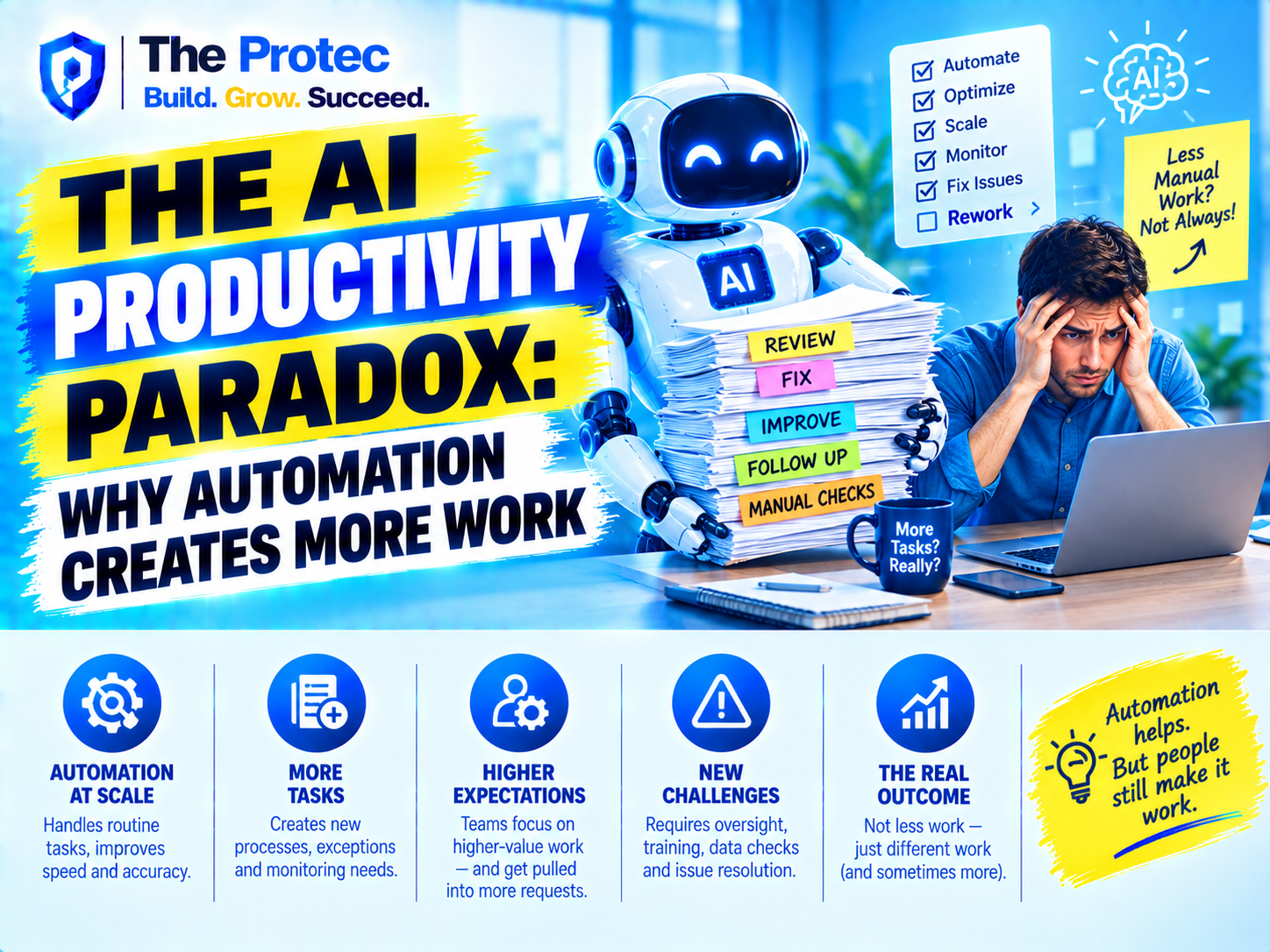
This is the AI productivity paradox: AI productivity tools make individual tasks faster, but the surrounding workload expands. Time saved on drafting can be consumed by fact-checking. Faster analysis can create demand for more analysis. Automated content production can flood teams with material that someone still needs to evaluate, coordinate, approve, and maintain.
By September 2026, the AI workplace extends well beyond standalone chatbots. Multimodal copilots, autonomous agents, meeting assistants, enterprise search systems, low-code automations, and AI features embedded in everyday software are changing how work moves through organizations. The central question is no longer whether AI work automation can accelerate tasks. It is whether that acceleration produces meaningful value or simply raises the speed and volume of work.
What Is the AI Productivity Paradox?
The AI productivity paradox describes the gap between the efficiency promised by AI automation and the workload employees actually experience. A tool may reduce the time required for one task without reducing the total amount of labor surrounding it.
Consider an AI-generated client report. The first draft may take minutes rather than hours, but an employee must still confirm the data, identify fabricated or unsupported claims, adjust the tone, apply organizational standards, secure approval, and take responsibility for the final result. The production step becomes faster while verification and governance become more important.
AI also changes expectations. If a team can produce five reports in the time it once took to create one, management may request five reports rather than allowing the team to reclaim the saved time. This rebound effect turns potential efficiency into additional output. AI employee productivity appears to improve because activity increases, even when attention, stress, and working hours do not.
Why Is AI Creating More Work?
Employees Become Supervisors of Machine Output
Generative AI rarely eliminates a complete job process. More often, it inserts a fast but imperfect contributor into that process. Employees must write instructions, provide context, select models, inspect results, correct errors, and decide when an output is safe to use.
This supervisory labor can be difficult to measure because it is spread across dozens of small actions. A worker may spend only a few minutes correcting each AI-generated email, summary, spreadsheet formula, or presentation slide. Across an entire day, however, those checks become a substantial new layer of work.
Faster Production Creates an Output Explosion
When content becomes inexpensive to generate, organizations generate more of it. Teams can quickly create proposals, reports, marketing variations, product ideas, support responses, and internal documents. The bottleneck then moves from creation to evaluation.
Every additional output competes for human attention. Someone must read the document, compare options, resolve contradictions, and determine what deserves action. AI overload is therefore not only about employees using too many tools. It is also about employees receiving more machine-generated material from colleagues, customers, vendors, and automated systems.
Automation Accelerates the Entire Workflow
AI workplace productivity tools can compress turnaround times, but faster workflows often lead to tighter deadlines. If a task can theoretically be completed in an hour, requests that once came with a three-day deadline may become same-day assignments.
This creates a pace problem. Employees lose the pauses that previously allowed them to reflect, prioritize, or recover between demanding tasks. Work moves continuously from generation to review to revision, and every efficiency gain becomes an argument for immediate delivery.
Tool Fragmentation Adds Coordination Costs
Many companies have adopted AI tools at work team by team rather than through a unified operating model. One department uses an AI meeting assistant, another deploys an autonomous workflow agent, and individual employees experiment with several writing or research platforms.
The result can be duplicated subscriptions, inconsistent outputs, scattered data, and confusion about which system is authoritative. Employees spend time transferring information between tools, rewriting prompts, reconciling summaries, and checking whether an automation has completed its assigned action. Automation intended to remove administrative work can create a new form of digital administration.
Errors Become Cheaper to Produce but Costly to Detect
AI systems can generate polished mistakes at extraordinary speed. Incorrect answers are not always obvious, especially when they are presented in fluent language or embedded in a large volume of accurate material.
Verification may require more expertise than creating the original output manually. A legal, financial, technical, or medical professional cannot approve a plausible response merely because it looks complete. The employee remains accountable, so AI productivity depends on the cost of checking the result, not just the speed of generating it.
How AI Automation Is Changing Knowledge Work
Traditional automation was often designed around predictable, repeatable processes. Generative and agentic AI systems operate in less structured areas such as writing, analysis, software development, customer communication, and decision support. This makes AI and work more deeply intertwined, but it also makes the results harder to evaluate.
Knowledge workers increasingly perform three roles at once: task owner, AI operator, and quality controller. They must understand the business objective, translate it into effective instructions, and judge whether the machine’s response is useful. When multiple AI agents participate in a workflow, employees may also need to monitor handoffs, permissions, exceptions, and unexpected actions.
The work has not necessarily disappeared; it has moved. Drafting becomes editing. Searching becomes validating. Scheduling becomes exception management. Data entry becomes workflow monitoring. In some cases, this shift improves the quality of a role. In others, it replaces focused creation with fragmented supervision.
When Increased Activity Is Mistaken for Productivity
One reason the AI productivity paradox persists is that activity is easier to measure than value. Organizations can count documents generated, tickets closed, code produced, emails answered, or campaigns launched. Those metrics may rise quickly after introducing AI productivity tools.
However, more output does not automatically mean better outcomes. A higher volume of sales messages can reduce response quality. More software code can create maintenance and security burdens. More reports can slow decisions if leaders must review overlapping conclusions. More customer responses can damage trust if they are generic or inaccurate.
Genuine AI workplace productivity should be measured through outcomes such as shorter customer resolution times, fewer errors, improved decision quality, reduced cycle time, higher employee capacity, and less rework. The measurement should include the full workflow, including prompting, checking, correcting, approving, and handling failures.
Organizations should also distinguish productive capacity from utilization. If AI saves an employee five hours, filling those five hours with more assignments may improve short-term throughput while eliminating the human benefit. Capacity for learning, strategic thinking, relationship building, and recovery has organizational value even when it does not appear on an activity dashboard.
AI Work Overload and the Risk of Burnout
AI burnout can emerge when automation raises expectations faster than it improves working conditions. Employees may be expected to adopt unfamiliar tools while maintaining their normal workload. They must learn prompting techniques, understand data restrictions, evaluate output quality, and adapt to continuously changing interfaces.
There is also a psychological burden. Workers can feel pressure to prove they are faster with AI or worry that declining an AI-generated shortcut will make them appear resistant. Constant machine assistance can intensify work by making every quiet moment seem like unused productive capacity.
The risk is especially high when organizations describe AI as a time-saving initiative but use it primarily to increase targets. Employees recognize the contradiction. If every saved hour leads to another assignment, they have little incentive to identify efficiencies or report the real performance of AI tools.
How Companies Can Make AI Reduce Work
Redesign the Process, Not Just the Task
Adding AI to a broken workflow usually creates a faster broken workflow. Companies should map the full process before automation, including approvals, handoffs, duplicate data entry, exception handling, and compliance requirements. The goal should be to remove unnecessary steps rather than accelerate every existing step.
Measure Net Time Saved
AI productivity measurement must include hidden labor. Track the time spent preparing inputs, reviewing outputs, correcting mistakes, coordinating with other systems, and recovering from failures. Compare that total with the previous process. A ten-minute generation step is not a productivity gain if it creates forty minutes of review and rework.
Set Quality and Risk Thresholds
Not every task requires the same level of human oversight. A low-risk internal brainstorm can tolerate more uncertainty than a regulatory filing or customer-facing financial recommendation. Organizations should define where AI output can be used directly, where sampling is appropriate, and where expert approval remains mandatory.
The NIST AI Risk Management Framework offers a useful structure for governing AI risks without treating every use case identically.
Control the Volume of Machine-Generated Work
Companies need standards for what should be generated, shared, and retained. Employees should not be encouraged to create ten versions when two carefully selected options would be sufficient. Meeting bots should not produce summaries that nobody needs, and automated reports should have a clear audience and decision purpose.
Return Some of the Time to Employees
If AI automation saves time, organizations should deliberately allocate part of that capacity to higher-value work, skill development, planning, or reduced overload. Without this protection, every efficiency improvement becomes workload inflation.
Leaders can set explicit rules, such as using a portion of documented time savings for process improvement or focus time. This signals that AI at work is intended to improve work quality, not merely increase production quotas.
Involve Employees in AI Decisions
The people performing a process usually understand its hidden complications better than software buyers or senior leaders. Employees should participate in selecting tools, designing controls, testing workflows, and defining success.
Research and policy analysis from the OECD on artificial intelligence and work also emphasizes the importance of skills, worker participation, and job quality as AI adoption expands.
Reduce Tool Sprawl
A smaller number of well-governed tools is often more productive than a large portfolio of disconnected AI applications. Organizations should review overlapping functions, integration requirements, security controls, accessibility, and actual employee usage. Retiring weak or redundant tools can reduce AI overload immediately.
What Employees Can Do About AI Overload
Employees may not control company-wide targets, but they can make hidden AI labor visible. Document recurring correction time, failed automations, duplicate outputs, and tasks that have become faster but more frequent. Frame the issue in terms of quality, risk, and total cycle time rather than personal preference.
Workers should also choose AI selectively. A task is a strong candidate for AI work automation when the output is easy to verify, the consequences of error are limited, and meaningful time is saved across the complete process. If explaining and checking the task takes longer than doing it directly, manual work may still be the efficient choice.
Frequently Asked Questions
Does AI always improve employee productivity?
No. AI employee productivity improves when a tool reduces total effort or produces a better outcome. If employees spend substantial time prompting, checking, correcting, and coordinating output, the apparent time savings may disappear.
Why does AI automation increase workload?
AI automation can increase workload by making output cheaper and faster to produce. Organizations may respond with higher targets and shorter deadlines, while employees inherit new responsibilities for supervision, verification, governance, and exception handling.
How can companies prevent AI burnout?
Companies can prevent AI burnout by limiting tool sprawl, providing training, setting realistic adoption timelines, measuring hidden review work, and allowing employees to retain some of the time saved. AI should remove low-value tasks instead of simply increasing production expectations.
What is the best way to measure AI workplace productivity?
Measure business outcomes across the full workflow. Useful indicators include total cycle time, error rates, rework, customer satisfaction, decision quality, employee workload, and time genuinely returned to teams. Output volume alone is not a reliable productivity measure.
Automation Should Create Capacity, Not Just More Output
The AI productivity paradox is not evidence that workplace AI has failed. It is evidence that speed alone is not productivity. AI can remove repetitive work and expand human capability, but only when organizations account for supervision, verification, coordination, and the pressure created by higher expectations.
The most successful AI workplace will not be the one generating the most material. It will be the one that makes better decisions, reduces unnecessary work, protects employee attention, and uses automation to create genuine capacity. If every saved minute is immediately filled, AI is not giving people time back. It is simply teaching work to move faster.