







Why translation API choice matters for modern products
If your product serves users in more than one language, your translation stack is not a side decision. It affects onboarding, search, support content, in-app messaging, checkout conversion, and even whether users trust what they see. The best translation API is not always the one with the biggest brand name. It is the one that matches your product’s quality bar, latency needs, language coverage, budget, and privacy requirements.
In practice, developers are usually comparing a few clear winners: DeepL API, Google Cloud Translation, Microsoft Translator API via Azure AI Translator, and several specialized APIs that focus on enterprise workflows, post-editing, or high-volume automation. The market has matured quickly, and the best choice depends on whether you are localizing a SaaS dashboard, translating user-generated content, or powering a multilingual website at scale.
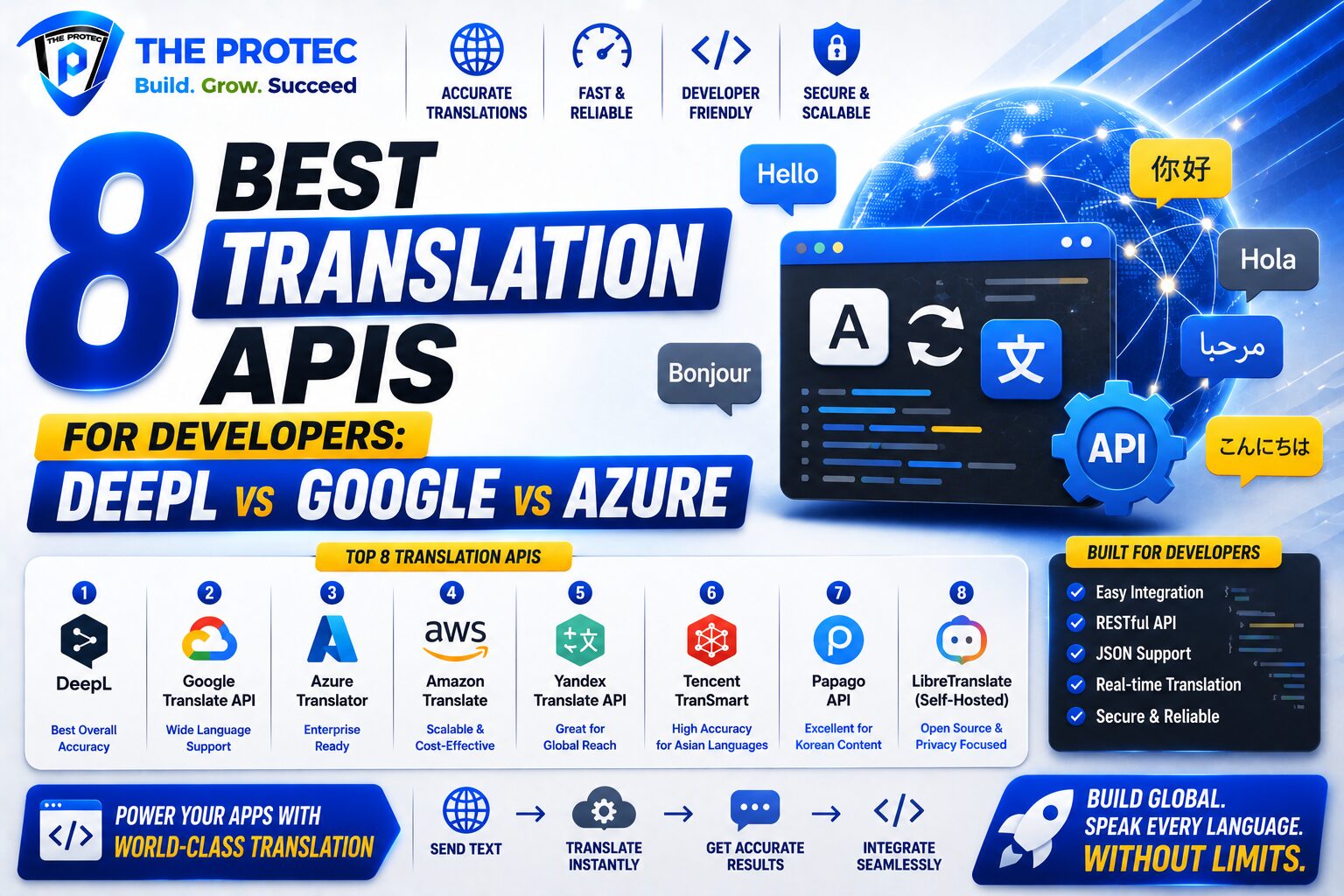
This guide breaks down the 8 best translation APIs for developers, with a commercial-intent comparison focused on translation quality, supported languages, translation API pricing, API limits, developer experience, and privacy. It also includes the most practical use cases for SaaS products, websites, and multilingual applications.
What developers should evaluate before choosing a translation API
Before comparing vendors, it helps to define what “best” means for your product. Translation quality matters, but so do throughput, glossary control, SDK quality, and how much work you want to do in your own app.
- Translation quality: Especially important for customer-facing content, product UI, and marketing copy.
- Language coverage: Some APIs excel in European languages, while others cover broader global needs.
- Pricing model: Per-character pricing can look cheap until your usage spikes.
- API limits and rate controls: Useful for batch jobs, real-time translation, and enterprise workloads.
- Customization: Glossaries, formality settings, custom models, and terminology controls can improve accuracy.
- Developer experience: Clean documentation, SDKs, and predictable responses save engineering time.
- Privacy and compliance: Critical if you process personal data, legal text, or regulated content.
1. DeepL API
DeepL is often the first name developers mention when discussing the DeepL API vs Google Translate API debate. Its biggest strength is translation quality, especially for European languages and polished, natural-sounding output. Many teams choose DeepL when the translated text is user-facing and needs to read like it was written by a native speaker rather than a machine.
DeepL has become especially attractive for SaaS companies and content platforms that care about tone, grammar, and readability. It supports glossary features, formal/informal tone in some languages, and a straightforward API experience. For many teams, that combination makes it the best translation API for quality-first workflows.
Strengths
- Excellent quality for many European language pairs
- Natural phrasing and strong handling of nuance
- Glossaries and style controls for terminology consistency
- Good fit for product localization and customer-facing content
Limitations
- Language coverage is narrower than Google Cloud or Microsoft Azure
- Not always the most economical choice for very high-volume workloads
- May not be ideal if you need broad low-resource language support
Best use cases
- SaaS products with premium UX requirements
- Marketing pages and landing pages
- Support content that must sound natural
For current product details and language support, review DeepL’s official API documentation at deepl.com/docs-api.
2. Google Cloud Translation
Google Cloud Translation remains one of the most versatile enterprise-grade options, especially for teams that need scale, broad language coverage, and integration with the wider Google Cloud ecosystem. If your priority is breadth and reliability, Google is often the benchmark.
The platform is particularly useful for multilingual applications, high-volume content pipelines, and products that need fast translation across many languages. It also offers advanced features such as glossary support and custom translation capabilities in certain workflows. While the output is not always as polished as DeepL in every language pair, the coverage and infrastructure are hard to beat.
Strengths
- Very broad language coverage
- Strong scalability and enterprise reliability
- Easy fit for teams already using Google Cloud
- Useful for batch translation, document workflows, and app localization
Limitations
- Translation quality can vary by language pair and content type
- UI and configuration can feel more cloud-platform oriented than developer-light
- Costs can rise quickly at scale if not monitored closely
Best use cases
- Large multilingual websites
- High-volume SaaS platforms
- Applications requiring broad language support and cloud integration
3. Microsoft Azure AI Translator
Microsoft Translator API, now typically accessed through Azure AI Translator, is a strong competitor for organizations already invested in Microsoft’s ecosystem. It offers reliable machine translation, solid enterprise controls, and practical features for developers building internal tools or customer-facing applications.
For many teams, Microsoft’s advantage is operational convenience. If your organization already uses Azure for identity, storage, security, or serverless workflows, adding translation into the same stack can simplify procurement and governance. The API is also known for decent language coverage and flexible deployment patterns across enterprise environments.
Strengths
- Good enterprise integration with Azure services
- Reliable for general-purpose translation workloads
- Useful compliance and governance alignment for Microsoft-centric teams
- Practical for internal tools, support systems, and multilingual apps
Limitations
- May not match DeepL on premium natural language quality
- Developer experience can feel more enterprise than startup-friendly
- Some teams find terminology control less intuitive than alternatives
Best use cases
- Enterprise SaaS products
- Microsoft-heavy infrastructure stacks
- Internal localization and workflow automation
4. Amazon Translate
Amazon Translate is a practical option for teams already running on AWS and looking for a straightforward, scalable translation service. It is not always the first choice for premium copy quality, but it can be a strong fit where throughput, automation, and infrastructure consistency matter more than nuanced literary translation.
Its value is strongest in pipelines where translation is one component of a larger AWS-based architecture. If your app already uses Lambda, S3, API Gateway, and DynamoDB, Amazon Translate can fit neatly into an automated processing workflow.
Strengths
- Clean fit inside AWS architectures
- Good for high-volume automation
- Useful for batch jobs and backend translation workflows
- Scales well for product operations
Limitations
- Quality may be less compelling for polished customer-facing copy
- Glossary and customization needs may require more engineering work
- Often chosen for infrastructure reasons more than linguistic reasons
Best use cases
- Backend translation pipelines
- AWS-native apps
- Operational content and bulk processing
5. OpenAI translation workflows via LLM APIs
While not a traditional dedicated translation API, many developers now use large language model APIs for translation when they need context awareness, tone adaptation, or multilingual rewriting. This trend has grown quickly as teams look beyond literal machine translation toward content that adapts naturally to product voice and audience expectations.
LLM-based translation can be powerful for localization tasks such as rewriting onboarding copy, adapting help articles, or generating region-specific variations. However, it is usually not the best choice for strict, deterministic machine translation at scale unless you implement strong validation and prompt discipline.
Strengths
- Excellent context sensitivity
- Can adapt tone and style, not just words
- Useful for localization beyond direct translation
- Good for hybrid workflows with editorial review
Limitations
- Less deterministic than dedicated translation engines
- Can be more expensive for bulk translation use cases
- Requires careful prompt design and QA
Best use cases
- Marketing localization
- Support content adaptation
- Translation plus rewriting workflows
6. Papago Translation API
Papago, from Naver, is especially noteworthy for teams targeting Asian language markets. It is not as universally adopted as Google or DeepL, but it can be a smart choice for certain language pairs and regional product strategies.
If your application needs strong support for Korean and other East Asian language use cases, Papago deserves a look. It is particularly relevant for businesses entering Asian markets where local language quality and regional nuance matter.
Strengths
- Strong regional relevance for East Asian languages
- Useful for products targeting Korean users
- Competitive for localized consumer applications
Limitations
- Smaller global footprint than major cloud platforms
- Less commonly used in Western enterprise stacks
- May not be the first choice for broad multilingual coverage
Best use cases
- Asia-focused apps
- Korean content workflows
- Regional consumer products
7. SYSTRAN Translate API
SYSTRAN has long been known in the language technology space, especially for enterprise and regulated environments. It is a strong contender when you need domain terminology support, industry-specific translation, or deployment options that align with more controlled environments.
For companies in legal, government, manufacturing, or technical sectors, SYSTRAN can offer a compelling balance between customization and operational control. It is less of a mainstream consumer choice and more of a specialist tool for organizations with specific translation governance needs.
Strengths
- Strong enterprise and domain-oriented positioning
- Useful terminology and customization features
- Good fit for specialized content types
Limitations
- Smaller mindshare than Google, DeepL, or Microsoft
- May require more evaluation to fit modern product teams
- Developer ecosystem is less familiar to startup teams
Best use cases
- Regulated industries
- Technical documentation
- Domain-specific translation workflows
8. Modern translation platforms with API access
Beyond the big cloud vendors, some modern translation platforms combine machine translation, workflow management, and human review. These solutions are especially valuable when translation is not just an API call but part of a broader localization process.
For developers, the appeal is often in orchestration: automated content detection, glossary enforcement, translation memory, reviewer workflows, and CMS integrations. These platforms can reduce operational overhead for marketing teams and product localization managers, even if the underlying engine is not always exposed in the same way as Google Cloud or DeepL.
Strengths
- Useful for end-to-end localization workflows
- Can combine machine and human review
- Often easier for content teams to manage at scale
Limitations
- May be more platform than pure API
- Not always best if you only need raw translation endpoints
- Pricing and limits may depend on workflow complexity
Best use cases
- Content-heavy SaaS products
- Multilingual websites with editorial review
- Teams that need translation operations, not just translation requests
DeepL API vs Google Translate API: which should developers choose?
The DeepL API vs Google Translate API comparison usually comes down to quality versus breadth. DeepL is often the better answer when you want elegant, human-like output for fewer languages. Google Cloud is often the better answer when you need scale, broader coverage, and predictable enterprise infrastructure.
If your product is customer-facing and language quality directly impacts trust, DeepL usually deserves a serious evaluation first. If your product must support dozens of languages, handle large volumes, or integrate deeply with cloud-native systems, Google Cloud often wins on practicality.
For many teams, the best approach is hybrid: use DeepL for premium user-facing copy and Google Cloud or Microsoft Translator API for bulk, fallback, or internal translation tasks.
Microsoft Translator API vs DeepL and Google
Microsoft Translator API sits in a very practical middle ground. It is not always the absolute best at any one thing, but it can be the easiest to deploy for organizations already standardized on Azure. If your team values identity, compliance, and infrastructure consistency, Azure AI Translator can be a smart commercial decision.
Compared with DeepL, Microsoft usually loses on premium language feel. Compared with Google, it can be more attractive for Microsoft-native governance and enterprise workflows. That makes it particularly relevant for internal tools, knowledge bases, and SaaS products built on Microsoft infrastructure.
Translation API pricing: what developers should watch
Translation API pricing is rarely just about the posted rate per million characters. You also need to account for minimums, monthly free tiers, document translation charges, custom model costs, and how your usage spikes in production.
- Per-character rates: The most common model, but easy to underestimate at scale.
- Free tiers: Useful for prototyping, but rarely enough for production.
- Batch discounts: Sometimes available for large workloads.
- Document translation fees: May differ from plain text pricing.
- Feature premiums: Glossaries, custom models, or enhanced privacy controls may cost more.
As a rule, DeepL is often chosen for quality first, while Google Cloud and Microsoft Azure are frequently chosen for broader platform economics and enterprise integration. The cheapest option is not always the least expensive once you factor in developer time, QA overhead, and localization rework.
API limits, throughput, and latency considerations
For production systems, rate limits and latency can matter as much as linguistic quality. A translation API that looks great in testing can become painful if you send thousands of parallel requests during a product launch or import job.
Before committing, test the API under realistic conditions:
- Single-request latency for UI translation
- Batch throughput for bulk content
- Error handling for malformed text
- Retry behavior and timeout handling
- Rate limits during peak traffic
For SaaS products, translation should be invisible to the user. That means predictable response times, graceful fallback behavior, and a caching strategy for repeated text. For websites, especially CMS-driven ones, batch translation and asynchronous processing often matter more than real-time speed.
Privacy, security, and compliance
If you translate customer data, internal documents, or regulated content, privacy should be a first-class selection criterion. Review whether the provider retains text for model improvement, how data is handled in transit and at rest, and whether enterprise terms are available.
This is especially important in healthcare, finance, HR tech, legal software, and enterprise SaaS. Many teams prefer major cloud providers because they already have established compliance programs and procurement processes. Others choose DeepL for quality and then layer internal governance around sensitive content.
Do not assume all translation APIs handle data the same way. Check retention policies, regional processing options, and contractual terms before integrating production workloads.
Which translation API is best for SaaS products, websites, and multilingual apps?
Best for SaaS products
For customer-facing SaaS, DeepL is often the best translation API when language quality is the priority. Microsoft Translator API is attractive for Azure-native businesses, while Google Cloud is ideal when scalability and language breadth are more important than polish alone.
Best for websites
For multilingual websites, Google Cloud Translation is often the safest default because it handles scale, batch jobs, and many language pairs. DeepL is excellent for premium landing pages, product pages, and marketing copy where tone matters.
Best for multilingual applications
For apps with dynamic user content, Google Cloud and Microsoft Azure are strong operational choices. If the application is premium, polished, and language-sensitive, DeepL often delivers the best experience for end users.
Final verdict: how to choose the best translation API
There is no universal winner, but there is a clear decision pattern. If you want the highest perceived translation quality for many customer-facing use cases, DeepL is the strongest contender. If you need global coverage, cloud scale, and practical enterprise integration, Google Cloud Translation is hard to beat. If your stack is already Microsoft-centered, Microsoft Translator API can be the easiest and most operationally efficient choice.
For many teams, the smartest setup is not a single provider but a tiered strategy. Use DeepL for premium-facing content, Google or Microsoft for bulk translation and fallback, and a workflow platform if human review is part of the process. That approach gives you flexibility, cost control, and better user experience across your multilingual product surface.
FAQ
What is the best translation API for developers?
The best translation API depends on your use case. DeepL is often best for quality, Google Cloud for coverage and scale, and Microsoft Translator API for Azure-centric enterprise environments.
Is DeepL better than Google Translate API?
For many customer-facing texts, yes. DeepL often produces more natural output. Google Cloud Translation usually wins on language breadth, infrastructure scale, and broader enterprise fit.
Which translation API is cheapest?
That depends on volume, request patterns, and features. Translation API pricing varies by provider, and the cheapest per-character option may not be the lowest total cost once you include QA and rework.
Can I use more than one translation API in the same product?
Yes. Many teams use a hybrid setup, routing premium content to DeepL and bulk or fallback translations to Google Cloud or Microsoft Azure.
Are translation APIs safe for sensitive data?
They can be, but you must review retention policies, compliance options, and enterprise terms. For sensitive workloads, choose providers with clear privacy controls and data processing agreements.