








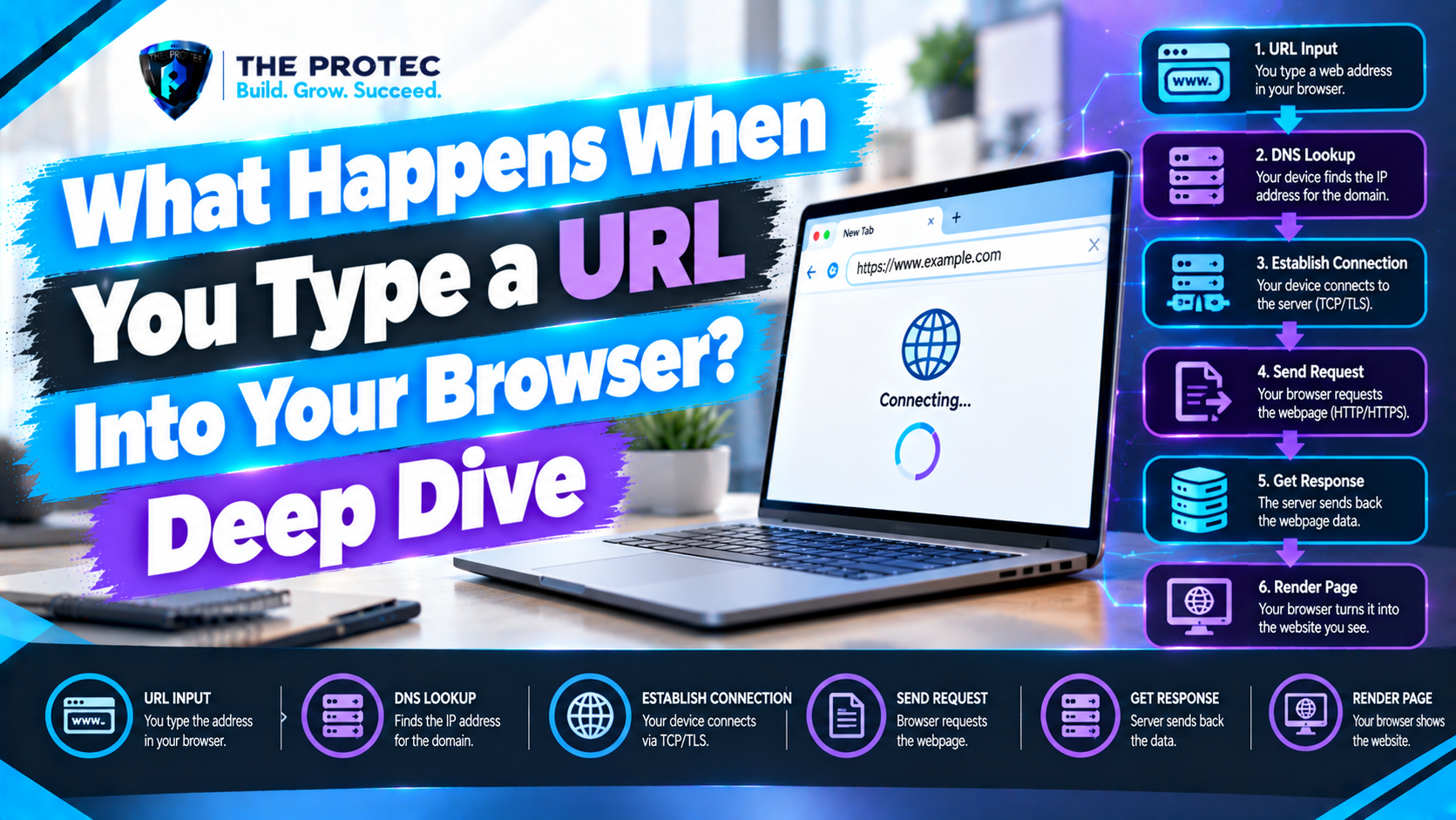
You type an address, press Enter, and a webpage appears. That simple action can trigger DNS queries, cache checks, encrypted connection setup, server-side application logic, multiple HTTP exchanges, and a carefully coordinated rendering pipeline inside the browser.
Understanding what happens when you type a URL into a browser is useful far beyond technical curiosity. It helps developers diagnose slow pages, configure secure infrastructure, reduce render-blocking work, and understand why a site behaves differently on a first visit than on a repeat visit. This deep dive follows one realistic request in order while showing where modern technologies such as HTTP/3, CDNs, service workers, and connection reuse can alter the journey.
Our Example: One URL, Several Systems
Suppose you enter https://shop.example.com/products/keyboard?color=black#reviews and press Enter. The browser must interpret the URL, find the server responsible for shop.example.com, establish a secure connection, request the resource, receive a response, and convert that response into pixels.
The network lifecycle and browser rendering process are related but distinct. Networking retrieves the document and its dependencies. Rendering parses those resources, calculates their visual presentation, and displays the result. Streaming allows the two lifecycles to overlap rather than waiting for the entire response to download.
Step 1: The Browser Parses the URL
The browser first determines whether the address-bar input is a URL or a search query. Once recognized as a URL, it separates the value into components:
- The scheme is https, which requires a secure connection.
- The hostname is shop.example.com.
- The path is /products/keyboard.
- The query string is color=black.
- The fragment is reviews.
The fragment is handled locally and is never included in the HTTP request. It tells the browser where to scroll or which client-side state to activate after the document loads. The path and query, by contrast, help the server identify and customize the requested resource.
The browser also applies security policies. An HSTS rule may upgrade an HTTP URL to HTTPS before any insecure request occurs. It then checks whether a service worker controls the origin and whether navigation data can be served from a local cache. If a usable cached response exists, much of the external browser request lifecycle may be skipped.
Step 2: The DNS Lookup Process Finds an Address
Networks route traffic using IP addresses, not hostnames. DNS resolution translates shop.example.com into an IPv4 or IPv6 address. Before sending a query, the browser checks its DNS cache, followed by operating-system and local network caches. Cached records remain valid according to their time to live.
If no answer is available, a recursive DNS resolver performs the lookup. It may already know the answer; otherwise, it queries the DNS hierarchy. A root server points toward the .com name servers, a .com server identifies the authoritative servers for example.com, and an authoritative server returns the relevant address or alias records.
DNS may operate through a traditional resolver, DNS over HTTPS, or DNS over QUIC, depending on browser, device, and network settings. Modern HTTPS DNS records can advertise HTTP/3 support and connection parameters before the browser contacts the site. They may also support Encrypted Client Hello deployment, which reduces hostname information exposed during connection establishment.
Many sites resolve to a content delivery network rather than a single origin server. The CDN uses geography, network conditions, and edge availability to direct the request to a suitable location. For a detailed overview of DNS concepts, see Cloudflare’s DNS guide.
Step 3: The Browser Establishes TCP and TLS—or QUIC
After DNS resolution, the browser needs a transport connection. With HTTP/1.1 or HTTP/2, it normally opens a TCP connection to port 443. The classic TCP connection begins with a three-way handshake: the client sends SYN, the server answers with SYN-ACK, and the client responds with ACK. This establishes sequencing, acknowledgments, retransmission, and reliable delivery.
HTTPS then adds TLS. In a modern TLS 1.3 handshake, the browser sends a ClientHello containing supported cryptographic options and connection information. The server responds with its selected parameters and a certificate chain. The browser verifies that the certificate covers shop.example.com, chains to a trusted certificate authority, and is currently valid. Both sides derive symmetric session keys used to encrypt application traffic.
This HTTPS handshake protects confidentiality, integrity, and server authenticity. Session resumption can make a later connection faster by reusing previously negotiated security information, although browsers limit reuse to preserve security and privacy.
HTTP/3 follows a different route. It runs over QUIC on UDP rather than TCP. QUIC integrates TLS 1.3 into transport setup and supports independent streams, migration between networks, and faster recovery when individual packets are lost. TCP remains central to HTTP/1.1 and HTTP/2, but HTTP/3 is increasingly common for latency-sensitive modern sites.
Step 4: The Browser Sends the HTTP Request
Once a secure channel exists, the browser sends an HTTP request resembling a GET for /products/keyboard?color=black. It also supplies headers describing the target host, accepted content types and encodings, language preferences, cookies allowed by current security rules, and cache validators such as If-None-Match.
HTTP/2 and HTTP/3 encode headers efficiently and multiplex multiple streams over one connection. This matters because the HTML will probably reference stylesheets, scripts, fonts, images, and API endpoints. Multiplexing lets those exchanges share a connection instead of requiring a separate TCP connection for every resource.
Credentials are not automatically sent everywhere. Cookie attributes, SameSite rules, origin boundaries, tracking protections, and the Fetch credentials mode determine what accompanies a request. Referrer policies also control how much information is disclosed about the previous page.
Step 5: CDN and Server Request Processing Begins
The request may reach a CDN edge first. If the edge has a fresh cache entry matching the URL and relevant request headers, it can return the page without contacting the origin. Otherwise, it forwards the request through a load balancer or reverse proxy to an available application server.
The server request processing path depends on the architecture. Middleware may terminate authentication, apply rate limits, select a locale, or assign an experiment. Application code validates the product identifier and query string, retrieves inventory and pricing from databases or services, and produces a response. The HTML might be fully server-rendered, streamed from a framework, assembled at the edge, or reduced to an application shell that relies on client-side JavaScript.
The server returns a status code and headers before or alongside the body. A successful response usually uses 200. A 301 or 308 redirect instructs the browser to repeat navigation at another URL, while a 302 or 307 performs a temporary redirect. Each uncached redirect adds work and can require another DNS lookup or connection if the destination changes origins.
Step 6: The Response Travels Back
The response includes metadata such as Content-Type, Content-Encoding, Cache-Control, ETag, Content-Security-Policy, and Set-Cookie. HTML is commonly compressed with Brotli or gzip during transfer. The transport divides bytes into packets, handles loss, and reassembles ordered data for the browser.
The browser does not need to wait for the final byte. As HTML streams in, it can begin parsing immediately. A server may also send a 103 Early Hints response so the browser can preload important stylesheets or fonts while the final response is still being generated.
Step 7: HTML Parsing Creates the DOM
The rendering engine decodes the response according to its declared character encoding and tokenizes the HTML. Tokens become nodes in the Document Object Model, or DOM. The DOM represents elements, attributes, and text as a tree that JavaScript can inspect and modify.
While the main parser advances, a preload scanner looks ahead for resource references. It can start fetching stylesheets, scripts, images, and fonts before the parser reaches the point where each resource is required. Priority hints and browser heuristics influence which downloads receive bandwidth first.
Step 8: CSS Becomes the CSSOM
CSS files are parsed into the CSS Object Model. The browser must understand applicable styles before it can render content accurately, so external stylesheets in the document head are typically render-blocking. Large CSS bundles, slow font requests, and late style injection can therefore delay visible output.
The browser combines DOM structure with CSSOM rules to create a render tree containing visible elements and their computed styles. Nodes hidden with display:none are omitted, while pseudo-elements and generated content may appear even though they are not ordinary DOM nodes.
Step 9: JavaScript Executes and Can Change Everything
A classic script without defer or async normally pauses HTML parsing while it downloads and executes. This behavior exists because the script could modify the document with APIs such as document.write. A deferred script downloads in parallel and runs after HTML parsing, preserving document order. An async script executes as soon as it is ready, while JavaScript modules are deferred by default and support dependency graphs.
JavaScript may add DOM nodes, change classes, fetch API data, or register event handlers. These actions can invalidate style calculations or layout. Long tasks also block the main thread, delaying interaction even if the page looks complete. Modern performance work therefore emphasizes smaller bundles, code splitting, selective hydration, server components, and moving suitable computation to workers.
Step 10: Layout, Paint, and Compositing Produce Pixels
After constructing the render tree, the browser enters the visual stages of the browser critical rendering path:
- Style calculation determines the final rules applied to each visible element.
- Layout calculates dimensions and positions based on the viewport and document flow.
- Paint records drawing operations for text, backgrounds, borders, images, and effects.
- Compositing combines rasterized layers, often using the GPU, into the displayed frame.
Later changes do not always repeat every stage. Changing an element’s geometry may trigger layout and paint, while a well-managed transform can often be handled primarily by the compositor. Layout shifts occur when dimensions change after content is visible, which is why images should have known sizes and critical fonts should be loaded carefully.
This sequence is explained further in web.dev’s critical rendering path guide. A page is not necessarily finished when it first paints: images may still decode, JavaScript may continue hydrating components, and background requests may update content.
How Caching, Reuse, and Preloading Change the Journey
The full URL-to-webpage process is most visible on a cold first visit. Repeat navigation can be much shorter because several layers retain work:
- DNS caches can eliminate recursive lookup.
- TLS session resumption can reduce secure setup work.
- Persistent HTTP/2 or HTTP/3 connections can serve later requests without a new handshake.
- Browser and CDN caches can return fresh responses immediately.
- A conditional request can receive 304 Not Modified instead of a complete body.
- A service worker can serve cached content or implement an application-specific offline strategy.
- Preconnect, preload, and speculation rules can perform selected work before navigation.
- The back-forward cache can restore an entire page, including JavaScript state, without reloading it.
These optimizations are powerful, but incorrect cache headers, excessive preloading, or unnecessary cross-origin connections can waste bandwidth. Effective browser networking depends on prioritizing likely critical work rather than starting everything early.
Network Lifecycle vs. Rendering Pipeline
The HTTP request lifecycle covers address resolution, connection setup, request transmission, server processing, and response delivery. The rendering pipeline covers DOM and CSSOM construction, script execution, style calculation, layout, paint, and compositing.
They overlap through streaming and resource discovery. A delayed stylesheet is a network problem that blocks rendering; a downloaded script that monopolizes the main thread is a rendering and execution problem. Separating the two helps developers choose the right diagnostic tools and optimization strategy.
Frequently Asked Questions
Does DNS run every time a page loads?
No. Browsers, operating systems, routers, recursive resolvers, and CDNs all cache DNS information. A new lookup is needed when no valid cached answer exists, when a record expires, or when network conditions and privacy policies require different resolution behavior.
Does HTTPS always require both TCP and TLS?
HTTPS over HTTP/1.1 or HTTP/2 generally uses TLS over TCP. HTTPS over HTTP/3 uses TLS 1.3 as part of QUIC over UDP, so it does not establish a separate TCP connection. Both approaches authenticate the server and encrypt HTTP traffic.
What is usually the slowest part of loading a webpage?
It varies. High-latency networks amplify DNS and handshake costs, slow servers increase time to first byte, and large resources extend transfer time. On script-heavy applications, JavaScript parsing, execution, and hydration may dominate after networking finishes. Browser performance traces reveal which stage is responsible.
When is a webpage fully loaded?
There is no single universal moment. DOMContentLoaded means the initial HTML has been parsed and deferred scripts have run. The load event waits for many dependent resources, but applications may continue fetching data afterward. User-focused metrics such as largest contentful paint, interaction responsiveness, and layout stability often describe the experience better.
From URL to Interactive Page
How browsers load websites is a layered process: parse the URL, resolve DNS, establish a secure transport, exchange HTTP messages, process the request, stream the response, and convert HTML, CSS, and JavaScript into pixels. Caches, CDNs, redirects, service workers, HTTP/3, and reused connections may shorten or reroute individual steps, but the same core responsibilities remain. Understanding those boundaries turns a seemingly instant page load into a system developers can measure, debug, and improve.