








WhatsApp is making one of its most noticeable Android interface changes in recent years by placing Meta AI directly in the app’s main navigation bar. Instead of treating artificial intelligence as an optional shortcut tucked inside the chat screen, the WhatsApp Android redesign presents the assistant as a core destination alongside everyday messaging features.
The change makes Meta AI easier to find, but it also affects how people move between chats, calls, updates, and communities. Depending on the app version, account, and region, users may see a dedicated Meta AI button, a rearranged set of navigation tabs, or no change at all. That inconsistency is important: WhatsApp frequently activates interface updates on the server side, so installing the latest version does not guarantee immediate access.
Here is what the WhatsApp new design changes, where the AI assistant appears, how it works, and which details are part of a broader rollout rather than limited beta testing.
What Is Changing in the WhatsApp Android Redesign?
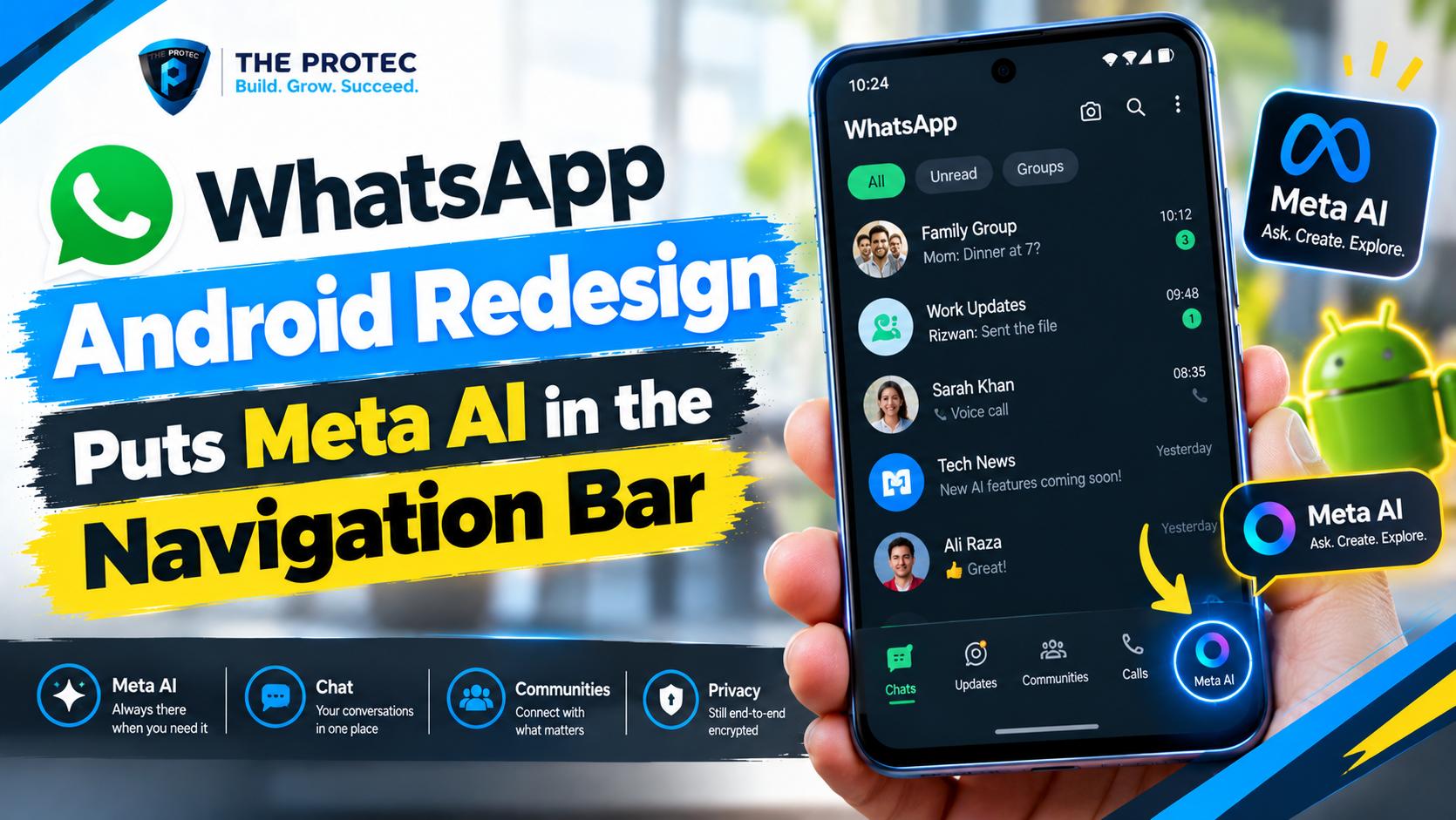
The central change is the elevation of Meta AI into WhatsApp’s persistent navigation. On eligible Android accounts, the redesigned bottom bar includes an AI entry that remains accessible while users move through the app. This removes the need to locate an AI shortcut inside a menu or scroll through the chat list to find an existing conversation with the assistant.
WhatsApp has used several layouts during the transition. The established Android interface has generally organized its main destinations into four bottom tabs:
- Chats for individual and group conversations
- Updates for Status posts and Channels
- Communities for connected groups and announcements
- Calls for voice and video call history
The evolving WhatsApp UI redesign gives Meta AI similar visual importance. Some builds add an AI destination to the navigation bar, while experimental layouts adjust the placement or visibility of another tab to keep the interface from becoming crowded. Communities may remain available through a different route in certain test configurations rather than disappearing as a feature.
This is more than a cosmetic update. Navigation bars communicate which functions an app considers essential. By putting Meta AI beside high-traffic messaging areas, WhatsApp is positioning the assistant as an everyday tool rather than a separate experiment.
Where the Meta AI Button Appears on WhatsApp
In the redesigned interface, the WhatsApp Meta AI button appears in the bottom navigation area. Its icon and label can vary between releases, but it is visually distinct from the standard Chats, Updates, Communities, and Calls controls. Tapping it opens a dedicated AI experience where users can start a prompt or return to previous interactions.
Some users may also continue to see Meta AI in other places. WhatsApp has tested and deployed a circular AI shortcut above the chat list, AI search functionality, suggested prompts, and the ability to start an AI chat from the new-chat menu. The navigation-bar placement does not necessarily eliminate all of those access points immediately.
That overlap is typical of a staged WhatsApp interface update. The company can compare how people respond to a dedicated tab, a floating button, or contextual shortcuts before settling on a consistent design. As a result, two Android phones running the same apparent app version may display different Meta AI controls.
If the feature is enabled for an account, using Meta AI on WhatsApp is straightforward:
- Open WhatsApp on an Android phone.
- Look at the bottom navigation bar for the Meta AI icon or AI label.
- Tap the button to open the assistant.
- Review any first-use notice explaining how AI conversations are processed.
- Enter a question or select a suggested prompt.
The assistant can answer general questions, explain topics, help draft messages, generate ideas, summarize user-provided text, and offer recommendations. Image creation or editing may also be available, although specific WhatsApp AI features depend on language, location, account eligibility, and Meta’s current product rules.
Meta AI can also appear as a conversational contact. In supported group chats, users may be able to address it with an “@Meta AI” mention. Only messages intentionally shared with or directed to the assistant are sent for AI processing; the new navigation button does not give Meta AI automatic access to every conversation on the device.
How the New Layout Differs from the Previous Design
The previous WhatsApp Android navigation emphasized communication formats. Chats, Status or Updates, Communities, and Calls each represented a different way of interacting with people. AI tools were secondary and often surfaced through a colorful shortcut, search field, or separate conversation.
The WhatsApp new navigation bar changes that hierarchy in three significant ways.
Meta AI Becomes a Primary Destination
A persistent Meta AI tab is harder to overlook than a floating icon. It remains visible across major sections of the app and reduces the number of steps needed to begin an AI conversation. This is the clearest indication that Meta wants its assistant to become part of normal WhatsApp usage.
Adding another destination creates limited space, especially on smaller Android displays. WhatsApp can respond by showing more tabs, shortening labels, rearranging icons, or moving a lower-use destination elsewhere. Beta layouts should not be interpreted as a guaranteed final arrangement because the company regularly tests multiple variations.
Messaging and AI Are More Closely Connected
Users no longer have to think of the assistant as a separate service. They can ask Meta AI for a dinner idea, request help writing an invitation, and then return to a family chat with one tap. The redesigned navigation makes that movement between assistance and communication much faster.
What the Update Means for Everyday Messaging
For people who already use Meta AI WhatsApp tools, the redesign improves convenience. The assistant is available without searching for its conversation, and a dedicated area can provide a cleaner starting point for prompts, generated content, or AI discoveries.
The practical benefits are most apparent in small, frequent tasks. A user could ask for alternative wording before sending a work message, create a packing checklist during a group discussion, translate user-provided text, brainstorm a caption for Status, or generate questions for an upcoming event. Keeping the assistant in the WhatsApp navigation bar reduces friction around these actions.
For users who do not want AI, the effect is different. A dedicated AI button occupies valuable interface space even when it is never selected. Availability of a setting to hide or remove that button may vary, and some versions may not provide one. The redesign therefore reflects Meta’s product priorities more clearly than individual user preferences.
Core messaging still works in the familiar way. The Meta AI button WhatsApp is testing or rolling out does not replace private chats, group conversations, calls, Channels, Status, or Communities. It changes how those areas are reached and gives AI a more prominent position beside them.
Privacy Considerations Before Using WhatsApp Meta AI
WhatsApp’s personal messages and calls continue to use end-to-end encryption. However, an AI conversation is not the same as an ordinary private chat with a friend. Prompts sent to Meta AI must be processed by Meta’s systems so the assistant can generate a response.
Users should avoid entering passwords, financial information, confidential business material, medical records, identification numbers, or anything else they would not want processed by an AI service. They should also review the notice shown before first use and consult the official WhatsApp Help Center for current information about privacy, data handling, and feature availability.
The presence of Meta AI in the navigation bar does not mean the assistant is reading all chats. In group conversations, other messages are not automatically submitted to the AI simply because the feature exists. Interaction generally requires a user to open an AI chat, select an AI feature, or intentionally mention the assistant. Even so, people should understand what they are sharing before pressing send.
Confirmed Rollout Details Versus Beta Tests
The distinction between released functionality and testing is essential. Meta AI is an integrated WhatsApp feature in supported markets, and eligible Android users can access it through interfaces chosen for their accounts. The movement toward a prominent navigation-bar entry is part of WhatsApp’s broader effort to make the assistant easier to reach.
What is not universal is the exact appearance of the redesigned bar. The number of tabs, their order, whether Communities moves, the wording of the AI label, and the presence of additional shortcuts can differ. Screenshots from beta releases show designs under evaluation, not promises that every element will reach the stable app.
Rollout status can be divided into three practical categories:
- Generally available features: Core WhatsApp messaging and Meta AI access in supported countries, languages, and eligible accounts.
- Staged interface changes: The dedicated WhatsApp navigation bar Meta AI entry, which may be activated gradually and independently of the installed version.
- Beta or limited tests: Specific tab arrangements, replacement behavior, icon treatments, prompt suggestions, and experimental AI capabilities.
Regional rules also matter. Meta AI has historically arrived at different times across countries because of language support, product readiness, and regulatory requirements. Users in the same region may still receive the update in waves. A business-managed device or work profile may introduce additional restrictions.
Android users should install updates through the official WhatsApp listing on Google Play. Joining a beta program can provide earlier access to tests, but it does not guarantee a particular design and may introduce bugs. Downloading unofficial APK files is not a safe way to force server-controlled features.
Why WhatsApp Is Giving AI Such a Prominent Position
WhatsApp is no longer competing only with messaging apps. Communication platforms increasingly include generative writing, search, content creation, recommendations, and automated assistance. A dedicated AI destination lets Meta deliver those capabilities inside an app people already open throughout the day.
The strategy also reduces the need for users to switch to a browser or standalone chatbot. If someone can research a simple topic, draft a reply, generate an image, and send the result without leaving WhatsApp, the app becomes more useful and retains attention for longer.
At the same time, placement does not guarantee adoption. The WhatsApp Android update must balance discoverability with simplicity. Too many tabs can make the interface feel crowded, while an unavoidable AI shortcut may frustrate people who prefer a messaging-focused experience. Continued testing suggests WhatsApp is still refining that balance.
What Android Users Should Expect Next
The WhatsApp redesign is likely to continue evolving through server-side experiments and regular app releases. Users should expect differences in labels, icons, navigation order, and supported AI functions as Meta evaluates engagement and feedback.
If the new bar has not appeared, there is usually nothing to troubleshoot beyond updating the app, restarting it, and checking again later. Reinstalling WhatsApp is unlikely to unlock an account-level rollout and creates unnecessary backup risks. Meta AI may also remain unavailable if the feature is not supported in the user’s country or language.
The larger direction is clear: WhatsApp Android new features increasingly combine private communication with optional AI assistance. The redesigned navigation gives that strategy a visible home, turning Meta AI from an occasional shortcut into one of the app’s main destinations.
Frequently Asked Questions
The redesign is delivered in stages and can depend on region, language, account eligibility, app version, and server-side activation. Updating WhatsApp is recommended, but it cannot force a feature that has not been enabled for your account.
Does the Meta AI tab replace Communities?
Not universally. Some experimental layouts change the visibility or position of Communities to make room for AI, while others retain it in the main navigation. The exact arrangement depends on the interface variant WhatsApp assigns to the account.
Some builds may provide limited control over AI shortcuts, but a dedicated navigation tab may not be removable. Settings differ across releases and regions, so users should check the current Chats and AI-related options in WhatsApp settings.
Does Meta AI read my private WhatsApp messages?
The navigation-bar button does not give Meta AI automatic access to all private conversations. The assistant processes content that users intentionally send, share, or direct to it. Ordinary personal messages and calls remain end-to-end encrypted.
Meta AI itself is available in supported markets, while the navigation redesign is subject to staged deployment and account-level testing. Some stable-app users may receive it before others, and beta users may see layouts that never receive a broad release.